
Best Business Laptops for Work and Productivity
As an Amazon Associate, I earn from qualifying purchases. Some links may earn us a commission at no extra cost to you.
A good business laptop should make everyday work easier rather than simply winning a specifications contest. Reliability, keyboard comfort, video-call quality, security features, ports, battery life and support options often matter more than flashy graphics or an ultra-high-resolution screen. The five laptops below cover different working styles: a compact ThinkPad for mobile professionals, a practical HP for office deployments, an ASUS with useful wired connectivity, a powerful Dell for demanding workloads and a quiet Surface Laptop for long workdays.
Top Picks
1. Lenovo ThinkPad T14 Business AI Laptop — Best Overall for Mobile Professionals
The ThinkPad T14 balances portability with the features most business users need every day. This configuration combines a 14-inch FHD+ touchscreen with an Intel Core Ultra 5 225U processor, 32GB of DDR5 memory and a 1TB solid-state drive.
It also includes Windows 11 Pro, a fingerprint reader, a backlit keyboard, a 5MP webcam, Wi-Fi 6E and HDMI connectivity. The 14-inch size is easier to carry than a full-size office laptop while still providing enough screen space for documents, spreadsheets and video meetings.
No products found.
Pros
- Compact 14-inch business-focused design
- 32GB of memory supports heavy multitasking
- 1TB SSD provides useful local storage
- Fingerprint reader and Windows 11 Pro
- Higher-resolution 5MP webcam
Cons
- Smaller display than a 16-inch office laptop
- Touchscreen configurations may use more battery than basic non-touch panels
Who should buy it: Choose the ThinkPad T14 when you regularly move between offices, meetings and travel but still need strong multitasking performance.
2. HP ProBook 460 G11 — Best for Office Teams and Windows Deployments
The HP ProBook 460 G11 is a practical 16-inch business laptop built around an Intel Core Ultra 7 155U processor, 16GB of DDR5 memory and a 512GB SSD. The larger FHD+ display provides more workspace for spreadsheets, browser windows and side-by-side documents.
This configuration also includes Windows 11 Pro, a fingerprint reader, a 1080p infrared camera, a backlit keyboard, HDMI and Wi-Fi 6. The infrared camera can support convenient facial sign-in, while the fingerprint reader provides a second biometric option.
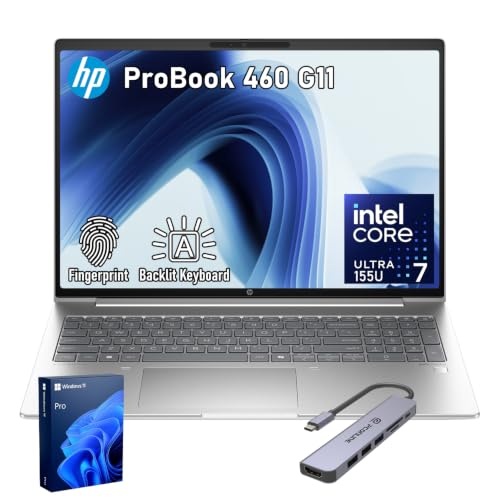
- [Built for Heavy Multitasking & Business Workloads] Configured with up to 64GB high-bandwidth DDR5 RAM and up to 2TB PCIe M.2 SSD, this laptop handles large spreadsheets, data analysis, presentations, CRM systems, browser-heavy workflows, and AI-assisted business tools with ease—ideal for professionals working across multiple applications all day.
- [Business-Class Performance with Intel Core Ultra 7 155U] Powered by Intel Core Ultra 7 155U Processor (12 Cores, 14 Threads, 12M L3 Cache, Max Frequency to 4.8 GHz with Turbo Boost), delivering strong multi-core performance, integrated AI acceleration, and energy-efficicent operation. Designed for enterprise users, analysts, developers, and managers who need consistent, reliable performance for long work sessions—not just short bursts.
- [16" Productivity Display – More Space, Less Scrolling] Features a 16" diagonal, WUXGA (1920 x 1200), IPS, narrow bezel, anti-glare, 300 nits, 45% NTSC display, providing more vertical workspace for documents, coding, dashboards, financial models, and multitasking, making it more efficient than standard laptops.
Pros
- Spacious 16-inch FHD+ display
- Intel Core Ultra 7 processor
- Fingerprint reader and infrared camera
- Windows 11 Pro
- Backlit keyboard and HDMI output
Cons
- Larger chassis is less convenient for frequent travel
- 512GB may be limiting for users with large local project files
Who should buy it: The ProBook is a strong fit for office employees, hybrid workers and small companies that want a conventional Windows business laptop with a large screen.
3. ASUS ExpertBook B1 — Best for Ports and Wired Office Networks
The ASUS ExpertBook B1 is designed for users who still depend on traditional office connections. Along with wireless networking, this configuration includes HDMI and an RJ45 Ethernet port, making it easier to connect to wired corporate networks, conference-room displays and existing office equipment without carrying as many adapters.
It pairs a 15.6-inch Full HD display with an Intel Core 7 150U processor, 16GB of DDR5 memory and a 512GB PCIe SSD. An infrared camera, Windows 11 Pro and a full-size screen make it a sensible everyday workstation.
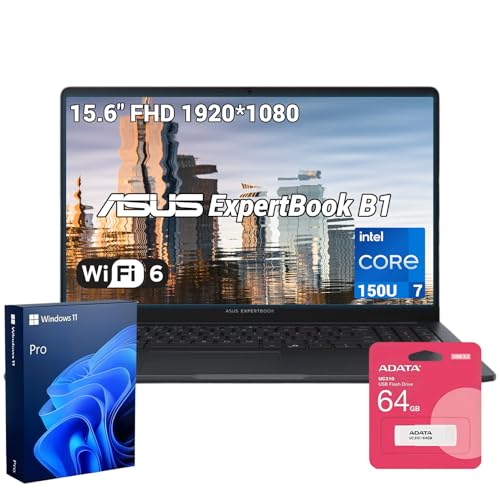
- 【AI-Powered Performance】 The ASUS ExpertBook B1 business laptop is equipped with Intel Core 7 150U processor, delivering reliable computing power and adopting AI-enhanced productivity technology to streamline daily office workflows and boost overall work efficiency for diverse business tasks.
- 【Vibrant Visual Experience】 Featuring a 15.6-inch FHD display with 1920*1080 resolution and 60Hz refresh rate, this anti-glare screen delivers clear and vivid visuals, ensuring comfortable viewing during long-hour business presentations, document reading and video conferences.
- 【Optimized Thermal System】 Built with ExpertCool for optimized thermal management, the laptop maintains stable temperature and steady performance under prolonged business operation, effectively avoiding overheating issues and supporting continuous work.
Pros
- Built-in Ethernet connection
- HDMI for monitors and presentation displays
- Infrared camera for compatible facial sign-in
- 16GB of DDR5 memory
- Windows 11 Pro
Cons
- 15.6-inch chassis is less compact than 14-inch alternatives
- Integrated graphics are intended for office work rather than demanding 3D applications
Who should buy it: Choose the ExpertBook when wired networking, straightforward monitor connections and conventional business ports are more important than having the thinnest laptop.
4. Dell Premium 16 — Best for Demanding Professional Workloads
The Dell Premium 16 is the performance-focused choice in this lineup. This configuration combines an Intel Core Ultra 9 285H processor with 32GB of memory, a 1TB SSD and NVIDIA GeForce RTX 5060 graphics.
Its 16.3-inch 2K-class display supports a 120Hz refresh rate, providing more screen space and smoother motion than a basic office panel. Windows 11 Pro makes it suitable for professional environments, while the dedicated graphics processor is useful for creative applications, engineering software, GPU-accelerated workflows and demanding multitasking.
No products found.
Pros
- High-performance Intel Core Ultra 9 processor
- Dedicated NVIDIA RTX 5060 graphics
- 32GB of memory
- 1TB SSD
- Large 120Hz display
- Windows 11 Pro
Cons
- More performance than ordinary office users need
- Dedicated graphics generally increase heat and power consumption
- Less travel-friendly than a compact 14-inch laptop
Who should buy it: This Dell is best for developers, designers, engineers, analysts and professionals whose workloads extend beyond email, documents and browser-based applications.
5. Microsoft Surface Laptop for Business — Best for Battery Life and Quiet Operation
The Surface Laptop for Business is designed around efficient Snapdragon X hardware, making it especially appealing for meetings, travel and long periods away from a charger. Its premium chassis, sharp touchscreen and high-quality webcam also suit professionals who spend much of the day in calls or presentations.
This business configuration ships with Windows 11 Pro and supports Microsoft’s Copilot+ features. The Arm-based processor runs quietly and efficiently, but organizations should verify compatibility with older applications, specialized peripherals and legacy device drivers before deployment.
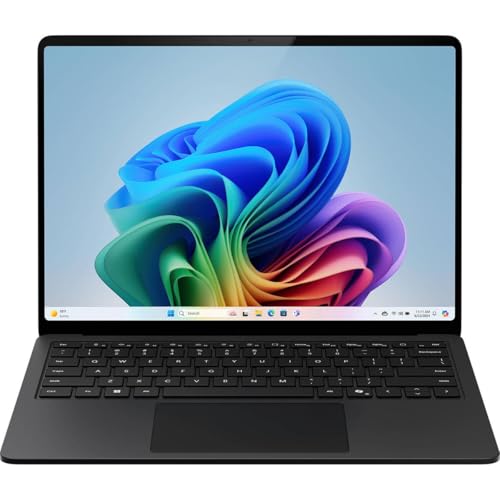
- IMPRESSIVE, RELIABLE POWER: Built with the latest Intel Core Ultra Processors (Series 2), enjoy powerful performance, reliable power, and AI capabilities
- All-DAY PRODUCTIVITY: Power through up to 22 hours of battery life[1]
- MORE POWERFUL AI PROCESSING: The Intel AI Boost NPU features up to 48 TOPS[10], designed to accelerate AI Experience
Pros
- Strong battery-life potential
- Quiet and cool operation
- Premium touchscreen design
- Good webcam for meetings
- Windows 11 Pro business configuration
Cons
- Older applications and drivers may require compatibility testing
- Memory and storage are not intended for routine user upgrades
- Limited physical ports compared with larger business laptops
Who should buy it: Choose the Surface Laptop when battery life, low noise, video calls and portability matter more than legacy software compatibility or extensive built-in ports.
Buying Guide
Choose the Right Screen Size
A 14-inch laptop is usually the best compromise for commuting and business travel. A 15.6- or 16-inch model provides more workspace and may include a numeric keypad or additional ports, but it occupies more desk and bag space.
Start with Enough Memory
For general office work, 16GB is a sensible starting point. Professionals running large spreadsheets, development environments, virtual machines, creative software or many browser tabs should consider 32GB. Confirm whether the memory is soldered because many modern thin laptops cannot be upgraded later.
Match the Processor to the Workload
Efficient U-series processors are suitable for documents, web applications, meetings and standard business software. Higher-power processors provide more speed for compiling code, data analysis and creative work but may produce more heat and shorten battery life.
Decide Whether You Need Dedicated Graphics
Most business users do not need a separate graphics processor. Integrated graphics are sufficient for office applications, video meetings and multiple displays. Dedicated NVIDIA graphics make more sense for 3D design, video editing, engineering applications and other GPU-accelerated workloads.
Check Windows Edition
Windows 11 Pro adds features intended for professional environments, including domain joining, BitLocker management and additional administrative capabilities. Windows 11 Home may be adequate for independent workers, but businesses should confirm their management and security requirements before ordering.
Evaluate Security Features
Useful business security features include a fingerprint reader, infrared facial recognition, TPM support, a webcam privacy shutter and firmware-level security controls. A biometric sensor improves convenience, but strong passwords, multifactor authentication and proper device management remain essential.
Think About Ports Before Buying
USB-C or Thunderbolt is important for modern docks, charging and external displays. Ethernet is still useful in offices with wired networks, while HDMI simplifies connections to monitors and presentation systems. A thin laptop with limited ports may require a dock or hub.
Confirm Software Compatibility
This is particularly important with Arm-based Windows laptops. Many common applications work natively or through emulation, but specialized software, older utilities, VPN clients and hardware drivers may require testing.
Examine Warranty and Support Options
Business laptops are often available with extended warranties, accidental-damage protection and next-business-day service. The exact coverage depends on the seller and configuration, so verify who provides the warranty before purchasing.
Frequently Asked Questions
How much RAM should a business laptop have?
Most buyers should choose at least 16GB. Consider 32GB for development, large spreadsheets, creative applications, virtual machines or heavier multitasking. Buying enough memory initially is especially important when the RAM is soldered.
Do I need Windows 11 Pro?
Windows 11 Pro is useful when a company needs domain support, BitLocker administration, Group Policy or centralized device management. Independent users who do not need those tools may be comfortable with Windows 11 Home.
Is a 14-inch or 16-inch laptop better for work?
A 14-inch laptop is easier to carry and use while traveling. A 16-inch model provides more workspace and may be more comfortable as a primary computer, particularly for spreadsheets and side-by-side documents.
Do business users need dedicated graphics?
Usually not. Integrated graphics handle standard productivity software, video calls and external monitors. Dedicated graphics are worthwhile for video production, CAD, 3D work, engineering and other accelerated applications.
Is the Surface Laptop compatible with all Windows software?
Not necessarily. Its Arm processor supports many modern Windows applications, but older software, specialized plug-ins and hardware drivers should be tested before purchase or company-wide deployment.
Is the ThinkPad T14 better than the HP ProBook 460 G11?
The ThinkPad is better suited to travel because of its smaller 14-inch form factor. The HP provides a larger display and may be more comfortable for employees who primarily work at a desk.
Should I buy a laptop with a touchscreen?
A touchscreen is useful for navigation, presentations and occasional annotation. It is not essential for conventional office work and may slightly affect battery life compared with a similar non-touch configuration.
Can these laptops replace a desktop computer?
Yes, particularly when connected to a USB-C dock, external monitors, a keyboard and a mouse. The Dell Premium 16 is the strongest desktop-replacement option here, while the ThinkPad and Surface prioritize portability.
Final Verdict
The Lenovo ThinkPad T14 is the best overall choice for most mobile professionals because it combines a manageable 14-inch size with 32GB of memory, a 1TB SSD and practical security features.
The HP ProBook 460 G11 is the better choice for employees who want a larger display, while the ASUS ExpertBook B1 stands out for wired networking and traditional office connectivity.
Choose the Dell Premium 16 for intensive professional applications that benefit from a powerful processor and dedicated NVIDIA graphics. The preserved Microsoft Surface Laptop for Business remains the strongest option for quiet operation, portability and long workdays away from an outlet.
As an Amazon Associate, I earn from qualifying purchases.