
Best Wi-Fi cards for faster, steadier PC internet (US)
As an Amazon Associate I earn from qualifying purchases. Some links may earn us a commission at no extra cost to you.
How I researched
-
I compared independent lab tests for throughput and latency at 6 GHz/5 GHz, read vendor spec sheets to confirm chipsets and Bluetooth versions, and checked US retailer listings to make sure the exact models are broadly available. I prioritized stable drivers, antenna design, and long-range performance over flashy peak numbers.
Top picks
1. MSI Herald BE — Best for next-gen speed (Wi-Fi 7)
If you want the fastest desktop card today, this Wi-Fi 7 option is a standout for short- and mid-range speeds on 6 GHz. The magnetized antenna base helps avoid case interference, and the included USB header cable enables Bluetooth 5.4.

- NCM865 Wi-Fi 7 Module
- Blazing Fast 5.8 Gbps Transfer Speeds
- 320 MHz Channel Widths (on 6GHz)
Pros
-
Class-leading Wi-Fi 7 throughput with strong range
-
External, magnetized antenna base
-
Bluetooth 5.4 support
Cons
-
Needs a free PCIe slot and motherboard USB header for BT
-
Wi-Fi 7 gains depend on having a Wi-Fi 7 router
2. GIGABYTE GC-WBAX210 — Best value Wi-Fi 6E (AX210)
A budget 6E favorite powered by Intel’s AX210. Delivers reliable Gig+ performance, includes Bluetooth 5.2, and ships with an antenna lead that’s easy to position for a cleaner signal.
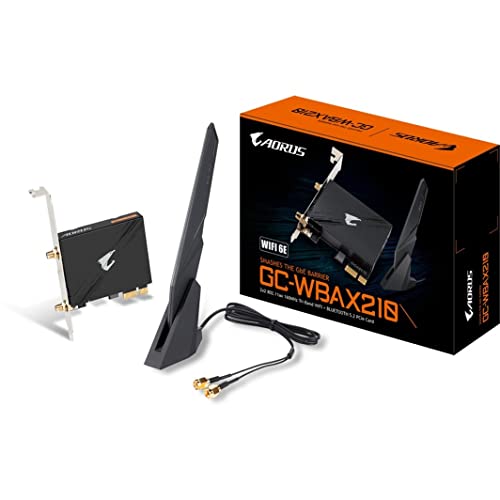
- Intel WI-FI 6E AX210 module built-in
- Dedicated spectrum in 6GHz band for maximum speed and ultra-low latencies
- Support dual-stream Wireless in the 2.4GHz, 5GHz and 6GHz bands

Pros
-
Excellent 6E performance per dollar
-
Intel AX210 + Bluetooth 5.2
-
External antenna with extension lead
Cons
-
Not as fast as Wi-Fi 7 at 6 GHz
-
Some rivals now offer newer BT versions
3. TP-Link Archer TXE75E — Best for easy 6E + Bluetooth 5.3
A widely available 6E PCIe card that checks the boxes: tri-band radio, magnetized base, and modern Bluetooth 5.3 for peripherals. A great “set it and forget it” upgrade for Windows desktops.

- 𝐖𝐢𝐅𝐢 𝟔𝐄 𝐒𝐭𝐚𝐧𝐝𝐚𝐫𝐝 — Expand to the clearer, broader 6 GHz band for more bandwidth and faster speeds;Boost your overall speeds up to 2402 Mbps (6 GHz) plus 2402 Mbps (5 GHz) plus 574 Mbps (2.4 GHz)¹. 𝐓𝐨 𝐮𝐭𝐢𝐥𝐢𝐳𝐞 𝟔𝐆𝐇𝐳 𝐖𝐢-𝐅𝐢, 𝐭𝐡𝐞 𝐮𝐬𝐞𝐫 𝐧𝐞𝐞𝐝𝐬 𝐭𝐨 𝐛𝐞 𝐮𝐬𝐢𝐧𝐠 𝐖𝐢𝐧𝐝𝐨𝐰𝐬 𝟏𝟏.
- 𝐑𝐞𝐥𝐢𝐚𝐛𝐥𝐞 𝐂𝐨𝐧𝐧𝐞𝐜𝐭𝐢𝐨𝐧𝐬 𝐰𝐢𝐭𝐡 𝐃𝐮𝐚𝐥 𝐀𝐧𝐭𝐞𝐧𝐧𝐚s — The latest Intel Wi-Fi 6E chipset’s reduced latency and improved reliability combined with two antennas unlocks your Wi-Fi 6E router’s full potential
- 𝐖𝐢𝐝𝐞𝐫 𝐒𝐢𝐠𝐧𝐚𝐥 𝐂𝐨𝐯𝐞𝐫𝐚𝐠𝐞 𝐰𝐢𝐭𝐡 𝐌𝐚𝐠𝐧𝐞𝐭𝐢𝐳𝐞𝐝 𝐁𝐚𝐬𝐞 — Two multi-directional antennas with a magnetized base are designed for optimal signal reception
Pros
-
Tri-band 2.4/5/6 GHz with WPA3, MU-MIMO, OFDMA
-
Bluetooth 5.3 for better power efficiency
-
Magnetized dual-antenna base
Cons
-
Trails Wi-Fi 7 flagships in raw speed
-
Requires PCIe slot and motherboard USB header for BT
4. ASUS PCE-AXE58BT — Best for ASUS ecosystem & builds
ASUS’s tidy 6E card with 160 MHz channels, a solid software/driver reputation, and a weighted, magnetized base. A nice fit for ASUS-centric builds.
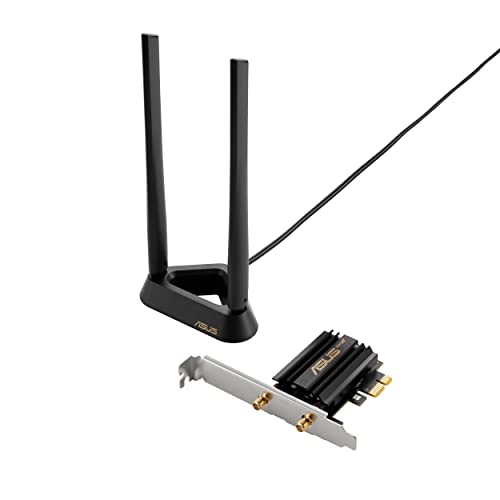
- ASUS WiFi 6E total solution - optimized capabilities and performance
- All-new 6 GHz band - Less congestion and interference for WiFi connections
- Latest Bluetooth 5.2 - improved signal range, faster transmit speeds and less interference
Pros
-
Wi-Fi 6E with 160 MHz channels
-
Magnetized base; WPA3, OFDMA, MU-MIMO
-
Broad US availability
Cons
-
Typically priced above similar AX210-based cards
-
Bluetooth is 5.2, not 5.3/5.4
5. MSI BE6500 (USB) — Best if you can’t use PCIe
No free PCIe slot? This Wi-Fi 7 USB adapter is the quickest I’ve seen tested, nearly reaching 2 Gbps at 6 GHz in ideal conditions. The weighted desk base lets you park the antennas where signal is cleanest.

- Lower latency: Upgrade your laptop/PC to WiFi 7 for faster connectivity and lower latency
- Blazing-fast tri-band speeds: Enjoy blazing-fast WiFi 7 speeds up to 2880 Mbps (6 GHz) + 2880 Mbps (5 GHz) + 688 Mbps (2.4 GHz)
- Multi-link operation (MLO): Enhances WiFi performance by combining multiple links for faster, more stable, and seamless connectivity
Pros
-
Very fast for USB; tri-band Wi-Fi 7 with up to 320 MHz channels
-
Drivers stored on the adapter for easy setup
-
Flexible placement via included base and cable
Cons
-
Still can’t fully match top PCIe cards
-
Performance varies more with USB port and cable placement
Buying guide
-
Router match matters: A Wi-Fi 7 card shines only with a Wi-Fi 7 router. Otherwise, a Wi-Fi 6E card gives you 6 GHz’s clean spectrum and great real-world gains.
-
Antenna placement > tiny spec deltas: Choose cards with a magnetized, cabled antenna base you can put on your desk rather than behind the PC.
-
Bluetooth version: For headsets and mice, BT 5.2 is fine; 5.3/5.4 adds power efficiency and stability for newer devices.
-
Drivers & OS: Windows 10/11 support is widespread; for Linux, prefer Intel-based chipsets (AX210/BE200 families) for smoother driver support.
-
Bandwidth myths: 320 MHz channels sound huge, but you only benefit on routers and environments that support them and aren’t congested.
-
USB vs PCIe: USB is convenient and great for small form-factor PCs, but PCIe wins for consistent latency and peak throughput.
FAQs
Q: Will a Wi-Fi 7 card speed up my old Wi-Fi 6 router?
A: It’ll work, but speeds will be limited to the router’s capabilities. You’ll still get any Bluetooth upgrades and potentially better antennas.
Q: Do I need 6 GHz support?
A: If your router supports 6E/7, yes—6 GHz is typically less congested and offers cleaner performance, especially in apartments.
Q: Are motherboards with built-in Wi-Fi just as good?
A: Often they use the same chipsets, but PCIe cards let you place antennas farther from interference, which can improve stability.
Q: What about gaming latency?
A: Ethernet is still king. If you must use Wi-Fi, prioritize Wi-Fi 7 or a strong 6E card with a remote antenna base.
Q: Do I need a free USB header for Bluetooth to work on PCIe cards?
A: Yes—most PCIe Wi-Fi cards use an internal USB header to enable Bluetooth. Without it, Wi-Fi works but BT won’t.
Q: Is USB good enough for VR streaming?
A: It can be, but PCIe cards are more consistent. If you go USB, use a short, high-quality cable and place the base in line-of-sight.
As an Amazon Associate, I earn from qualifying purchases.