
Best Webcams with a Mic Today
As an Amazon Associate, I earn from qualifying purchases. Some links may earn us a commission at no extra cost to you.
A webcam with a good built-in microphone simplifies video calls, classes, streaming, and remote work. The best models combine clear video with microphones designed to reduce room noise and keep speech understandable. This guide includes personal webcams for one-person desks, a 360-degree model for group discussions, and an all-in-one video bar for small conference rooms.
Top Picks
1. OBSBOT Meet 2 — Best Overall
The OBSBOT Meet 2 is a compact 4K webcam designed for meetings, streaming, and content creation. Its half-inch image sensor, autofocus, HDR support, gesture controls, and AI framing provide more flexibility than a basic fixed webcam. Its two omnidirectional microphones include noise reduction and automatic gain control, helping maintain a usable voice level as speaking volume changes.

- 【OBSBOT × EWC 2025 Official Partnership】OBSBOT is thrilled to be the 2025 Esports World Cup (EWC) Official Camera & Webcam Partner. Leveraging cutting-edge AI camera tech, OBSBOT will deliver immersive live broadcasts, capturing every epic moment of elite gamers. Also, OBSBOT provides content creators and streamers with the same pro imaging solutions, empowering global players to record esports highlights via EWC-approved AI camera tech.
- 【Mini in Size, Mighty in Sight】The upgraded OBSBOT Meet 2 webcam 4K combines AI features with a sleek compact design. Enjoy a wide selection of colors to personalize your setup, and experience improved performance without the high cost.
- 【Experience Stunning 4K Clarity】The UHD 4K resolution, coupled with the bigger 1/2" CMOS sensor, expands the Meet 2 webcam's light-sensitive area, boosting its light capture capacity to yield clearer, brighter images.
Pros
- Sharp 4K video
- Large sensor for a compact webcam
- Dual noise-reducing microphones
- AI framing and gesture controls
- Autofocus and HDR
- Lightweight design
Cons
- AI framing is digital rather than motorized
- Advanced settings require OBSBOT software
- 4K is unnecessary for basic video calls
Who should buy it: Remote workers and creators who want strong image quality, intelligent framing, and useful built-in microphones in a compact design.
2. EMEET SmartCam S600 — Best for Streaming
The EMEET S600 records at up to 4K at 30 frames per second or 1080p at 60 frames per second. Its faster 1080p mode is useful for demonstrations, live streams, and calls involving frequent movement. It also has fast autofocus, automatic light correction, an adjustable field of view, and two noise-cancelling microphones. The narrower field-of-view settings can help keep distracting room details outside the frame.

- Unmatched 4K Streaming Quality - The EMEET S600 streaming camera boasts a high-definition 4K sony 1/2.55'' sensor, delivering crisp, clear images far exceeding typical webcam quality. With versatile resolution options, enjoy stunning 4K at 30FPS or smooth 1080P at 60FPS. Ideal for aspiring streamers, game streaming, and content creation, this 4K webcam ensures exceptional experience for you and your audience. Note: Video resolution depends on built-in camera software or apps like PotPlayer/OBS.
- Advanced PDAF Autofocus & Light Balance – 4K webcam S600's PDAF(Phase Detection Autofocus) tech offers significant advantages over common autofocus such as faster speed, higher precision, and more stable performance in various scenes features. Its auto light adjustment capability balances shadows and highlights even in low-light environments, keeping every detail sharp and clear on screen, making it ideal for content creators and live streamers who demand top-tier performance and visual quality.
- Enhanced Audio Clarity & Customizable FOV - The EMEET S600 4K streaming webcam is equipped with premium microphones that use a proprietary algorithm to filter out background noise and capture your voice with exceptional clarity. Noise-canceling feature is enabled by default but can be turned off through the EMEETLINK software. At 1080P, the FOV adjusts 40°-73°, allowing you to focus on you and surroundings, while at 4K, it’s fixed at 73° for better image quality and less distortion.

Pros
- 4K at 30 frames per second
- Smooth 1080p at 60 frames per second
- Dual noise-cancelling microphones
- Fast autofocus
- Adjustable field of view
- Integrated privacy cover
Cons
- Fixed camera cannot follow movement
- Best 4K results require good lighting
- Microphone cannot replace a dedicated streaming mic
Who should buy it: Streamers, product demonstrators, and presenters who want 4K detail or smoother 1080p motion.
3. Lenovo 510 FHD Webcam — Best for Windows Hello
The Lenovo 510 FHD is a business-focused 1080p webcam with integrated infrared facial recognition for Windows Hello. That allows compatible Windows computers to unlock through facial recognition without entering a password. The camera also includes two integrated microphones and a rotating mounting design for easier positioning.

- High-Definition Teleconferencing: The Lenovo 510 FHD Webcam is optimized for teleconferencing applications on desktops and laptops. Its HD 1080p resolution and 1/2.9-inch RGB sensor size provide exceptional video quality with sharp and detailed visuals that feed or stream its image in real-time through a computer to a computer network
- Capture More: With the 95-degree wide-angle lens, 360-degrees rotation pan/tilt controls, and a 4X digital zoom, you can adjust your webcam effortlessly and see every detail for a more immersive experience
- Secure Plug-and-Play: Set up your webcam in seconds - just plug the USB 2.0 cable into any Windows or Mac device; UVC encode ensures compatibility with a wide range of video conferencing software and operating systems. Securely login to your device with Windows Hello 4.1 facial recognition technology
Pros
- Windows Hello facial recognition
- Full HD video
- Dual integrated microphones
- Flexible rotation
- Suitable for business calls
- Straightforward USB connection
Cons
- Limited to 1080p
- Windows Hello is not useful to macOS users
- No advanced AI tracking
Who should buy it: Windows users who want one webcam for video meetings and secure facial login.
4. NexiGo N660P — Best Value 1080p60 Webcam
The NexiGo N660P provides 1080p video at up to 60 frames per second, autofocus, software-based image controls, and two noise-reduction microphones. The higher frame rate produces smoother gestures and movement than a typical 30-frame-per-second office webcam. A physical cover provides a simple way to block the lens when the camera is not being used.
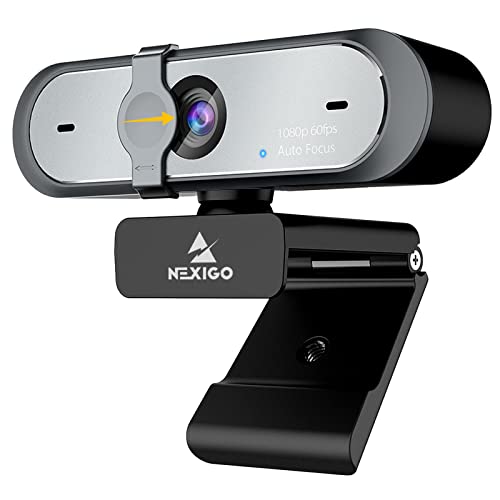
- 【FHD 1080p 60fps Webcam】The NexiGo N660P Webcam provides a high definition 1920 X 1080p resolution picture and comes with automatic white balance and exposure control. The webcam provides clear images and high-definition video at 60fps even in dim or poorly backlit settings as the camera will intelligently adjust to produce the best possible image.
- 【Built-in Dual Stereo Noise-Cancelling Microphones】The built-in dual stereo microphones are omnidirectional and come with noise-canceling technology that helps to filter background noise. It is perfect for online teaching, blogging, conferencing, live streaming, video calling, gaming, and more.
- 【Privacy Cover Included】The webcam comes with an attached privacy cover to protect your privacy and security. Slide the privacy cover open when you want to use the webcam and slide it back closed when you are finished. It prevents criminals from using your webcam when it is not in use by you. It helps provide security and peace of mind to our valued customers.
Pros
- 1080p at up to 60 frames per second
- Dual noise-reduction microphones
- Autofocus
- Physical privacy cover
- Software image controls
- Plug-and-play operation
Cons
- No 4K recording
- No AI tracking
- Image quality depends on adequate lighting
Who should buy it: Students and remote workers who want smooth Full HD video, dual microphones, and straightforward controls.
5. j5create JVCU360 — Best for Round-Table Meetings
The j5create JVCU360 is designed to sit in the center of a table and capture participants around it. Its selectable viewing modes include a full 360-degree panorama and focused layouts for one or more speakers. It records at up to 1080p at 30 frames per second and has an omnidirectional microphone with a stated pickup radius of approximately 10 feet. USB-C and USB-A connectivity help it work with a range of computers.
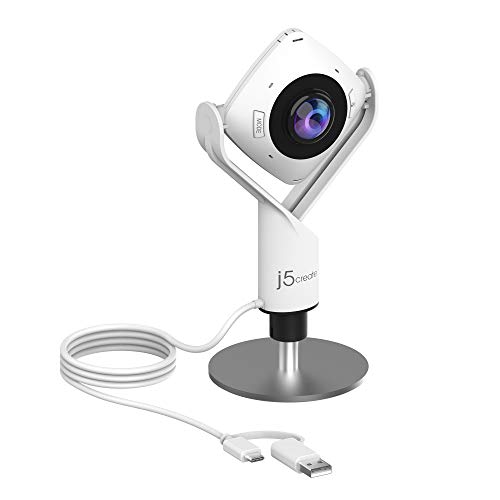
- 360° video conferencing camera with built in ominidirectional microphone
- Six display modes deliver exceptional viewing angles with flexibility and versatility
- Full HD 1080p video playback @ 30 Hz
Pros
- 360-degree room view
- Six display modes
- Omnidirectional microphone
- Approximately 10-foot stated pickup radius
- USB-C and USB-A connectivity
- Works with major meeting platforms
Cons
- Limited to 1080p30
- Not ideal for traditional solo streaming
- No physical privacy cover
- Panoramic video can appear distorted
Who should buy it: Small teams, study groups, and teachers who need to capture several people seated around one table.
6. Yealink UVC34 — Best for Small Conference Rooms
The Yealink UVC34 combines a 4K camera, microphone array, speaker, and automated framing in one USB video bar. Its camera provides a 120-degree field of view and 5x digital zoom. Despite the Amazon campaign title referring to ten microphones, Yealink’s current specifications list an eight-microphone MEMS array with a stated pickup range of up to five meters. It also includes noise suppression, echo cancellation, automatic framing, and an electrically operated lens cover.

- Impress Everyone in Every Meeting - Yealink UVC34 enables you to impress everyone in video meetings no matter where work happens. UVC34 integrates a 4K AI-powered camera, microphone array and speakers into a single device, enabling stunning video and audio experiences even in small and crowded rooms. Moreover, the all-in-one and plug-and-play design make it portable and simple to set up, no matter where you're working.
- Immersive Video Experience - By automatically framing participants, the 4K ultra-HD 8 megapixel camera delivers a crystal-clear and engaging video experience to remote participants. Featuring a 120° super-wide-angle len with 5x digital zoom, UVC34 captures tiny details in the room. Moreover, the image brightness can be automatically optimized even in a dim or backlight environment, ensuring the participant faces can be seen clearly.
- All-in-one Design, Plug and Play - Easy And Effective - Thanks to the compact design,admins save a lot of effort in deploying and maintaining devices. With the plug-and-play feature on the USB type A, you can simply walk into your next meeting with everything you need at your fingertips. No extra drivers are needed. Just an easy and effective solution for you to start a meeting no matter where you want.
Pros
- 4K camera
- Eight-microphone array
- Integrated speaker
- 120-degree field of view
- Automatic participant framing
- Noise and echo reduction
- Motorized privacy cover
Cons
- Too large and expensive for most personal desks
- Digital zoom reduces detail
- Designed primarily for fixed meeting spaces
Who should buy it: Businesses that need a complete camera, microphone, and speaker system for a small meeting or huddle room.
Quick Comparison
- Best overall: OBSBOT Meet 2
- Best for streaming: EMEET SmartCam S600
- Best for Windows Hello: Lenovo 510 FHD
- Best value 1080p60 webcam: NexiGo N660P
- Best for round-table meetings: j5create JVCU360
- Best for small conference rooms: Yealink UVC34
Buying Guide
Match the Microphone to the Room
Dual microphones are useful for a person seated directly in front of a monitor. Omnidirectional and multi-microphone systems are better when several people need to be heard around a table.
Choose the Right Resolution
Full HD is sufficient for most Zoom, Teams, and Meet calls. A 4K webcam is more useful when recording locally, cropping the image, demonstrating small objects, or producing content.
Consider Frame Rate
A 60-frame-per-second mode makes hand movements and demonstrations appear smoother. For normal meetings where participants remain seated, 30 frames per second is usually adequate.
Check Privacy and Software Controls
A physical or motorized lens cover provides visible privacy when the webcam is inactive. Software controls can adjust framing, exposure, field of view, noise reduction, and other features, but may require installation and occasional updates.
Frequently Asked Questions
Is a webcam microphone good enough for meetings?
Yes, provided the user sits reasonably close to the camera and the room is not excessively noisy or echo-prone. A dedicated microphone is still better for professional recording or streaming.
Does 4K improve microphone quality?
No. Video resolution and microphone quality are separate. A 1080p camera with a good microphone can sound better than an expensive 4K camera with weak audio.
Which webcam is best for a noisy room?
The OBSBOT Meet 2 and EMEET S600 provide noise-reduction features for personal calls. For a small conference room, the Yealink UVC34 has a larger microphone array and dedicated noise-processing features.
Which model is best for several people?
The j5create JVCU360 is designed for participants seated around a table. The Yealink UVC34 is better for a small room where participants sit facing a shared display.
Final Verdict
The OBSBOT Meet 2 is the best overall webcam with a built-in microphone because it combines 4K video, a relatively large sensor, intelligent framing, and dual noise-reducing microphones.
Choose the EMEET S600 for streaming and smoother 1080p video, or the Lenovo 510 FHD when Windows Hello is important. The NexiGo N660P is the most practical value option for everyday personal calls.
For group use, the j5create JVCU360 suits round-table discussions, while the Yealink UVC34 provides a more complete conference-room camera, microphone, and speaker system.
As an Amazon Associate, I earn from qualifying purchases.