
Best iPads: Top Picks for Students, Creators, and Everyday Users
As an Amazon Associate, I earn from qualifying purchases. Some links may earn us a commission at no extra cost to you.
The best iPad for most buyers is the 11-inch iPad Air with M4. It combines a high-quality laminated display, strong accessory support, and enough performance for demanding apps without requiring a move to the iPad Pro. For simpler browsing, streaming, schoolwork, and video calls, the standard 11-inch iPad with A16 is the better-value choice.
Top picks
1. iPad Air 11-inch (M4) — Best for most people
The 11-inch iPad Air is my default recommendation for buyers who want an iPad that can comfortably handle school, work, drawing, gaming, and media.
Why it wins: Its M4 processor, 12GB of unified memory, laminated P3 display, antireflective coating, and Apple Pencil Pro support provide a meaningful step up from the standard iPad without moving into iPad Pro territory. The Wi-Fi model weighs 1.02 pounds, and Apple rates it for up to 10 hours of web browsing or video playback.
The linked configuration is the current U.S. Wi-Fi, 128GB, Space Gray model.
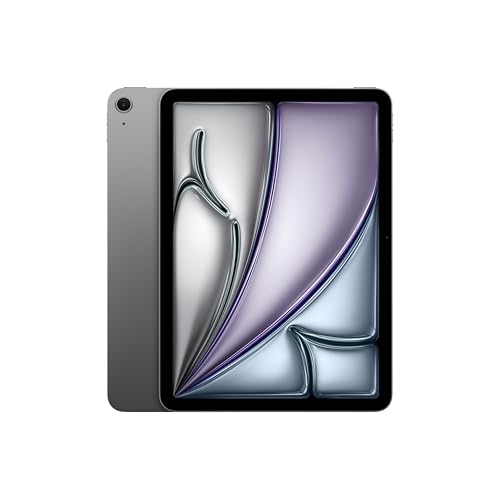
- WHY IPAD AIR — iPad Air with the Apple M4 chip packs even more performance into a beautiful design, and it comes in two portable sizes. It features Apple Intelligence* along with a stunning Liquid Retina display, Touch ID, advanced cameras, and Wi-Fi 7.*
- PERFORMANCE AND STORAGE — The M4 chip delivers advanced graphics and incredible performance for smooth multitasking and complex AI tasks. And with all-day battery life, you can keep working and playing wherever you go.* Choose up to 1TB of storage for apps, music, movies, and more.*
- IPADOS + APPS — Run apps and get more done with the game-changing capabilities and intuitive design of iPadOS. The flexible windowing system lets you control, organize, and manage your workflows like never before.

Pros
- M4 performance suits demanding creative and productivity apps
- Laminated, antireflective P3 display
- Supports Apple Pencil Pro and hover
- USB 3 supports transfers up to 10Gb/s
Cons
- Display remains limited to 60Hz
- Keyboard and Pencil are separate purchases
- No Face ID
Social proof: See reviews on Amazon.
Trade-offs / Who should skip: Skip it if basic streaming and browsing are the priority—the A16 iPad should be sufficient. Artists who need OLED contrast or 120Hz drawing response should consider the Pro instead.
Scores: Performance 4.8/5 · Display Quality 4.4/5 · Ease of Use 4.7/5 · Value 4.8/5
2. iPad 11-inch (A16) — Best value
The standard iPad is my pick for everyday browsing, video calls, streaming, email, documents, and school platforms.
Why it wins: It provides an 11-inch-class 2360-by-1640 display, an A16 chip, a landscape-oriented front camera, and 128GB of starting storage in Apple’s least expensive current iPad tier. Apple rates its battery for up to 10 hours of Wi-Fi browsing or video playback.
The display is not listed as laminated, P3-capable, or antireflective in Apple’s specifications. It also lacks Apple Intelligence support, making the Air a better long-term choice for buyers who expect to use Apple’s newer AI features.
The linked configuration is the current U.S. Wi-Fi, 128GB, Pink model.

- WHY IPAD — The 11-inch iPad is now more capable than ever with the superfast A16 chip, a stunning Liquid Retina display, advanced cameras, fast Wi-Fi, USB-C connector, and four gorgeous colors.* iPad delivers a powerful way to create, stay connected, and get things done.
- PERFORMANCE AND STORAGE — The superfast A16 chip delivers a boost in performance for your favorite activities. And with all-day battery life, iPad is perfect for playing immersive games and editing photos and videos.* Storage starts at 128GB and goes up to 512GB.*
- 11-INCH LIQUID RETINA DISPLAY — The gorgeous Liquid Retina display is an amazing way to watch movies or draw your next masterpiece.* True Tone adjusts the display to the color temperature of the room to make viewing comfortable in any light.
Pros
- Strong value for routine tablet tasks
- 128GB starting storage
- Landscape front-camera placement
- Supports USB-C Apple Pencil
Cons
- Non-laminated display feels less direct
- No Apple Intelligence support
- First-generation Pencil requires an adapter
Social proof: See reviews on Amazon.
Trade-offs / Who should skip: It may disappoint frequent illustrators because the display construction creates more visual separation between the Pencil tip and image. Buyers planning heavy editing, multitasking, or long-term AI use should move to the Air.
Scores: Performance 3.8/5 · Display Quality 3.5/5 · Ease of Use 4.6/5 · Value 4.9/5
3. iPad Air 13-inch (M4) — Best for a larger work canvas
The 13-inch iPad Air is my recommendation for split-screen work, sheet music, digital textbooks, presentations, and drawing on a larger canvas.
Why it wins: It combines the same M4 chip and 12GB of memory as the smaller Air with a 12.9-inch viewable display. Its laminated P3 panel reaches a listed 600 nits, compared with 500 nits on the 11-inch Air.
The larger model measures 11.04 by 8.46 by 0.24 inches and weighs 1.36 pounds in its Wi-Fi configuration. Apple rates it for up to 10 hours of web browsing or video playback.
The linked configuration is the current U.S. Wi-Fi, 128GB, Purple model.
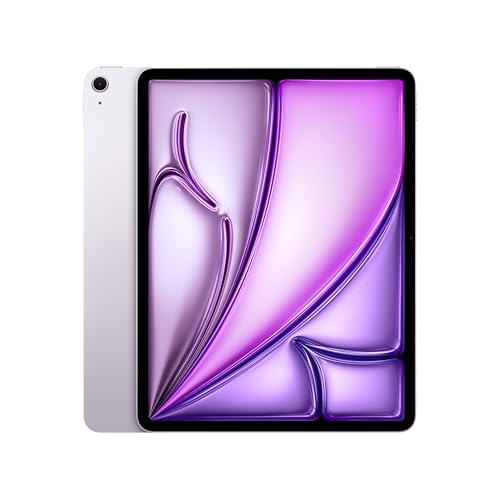
- WHY IPAD AIR — iPad Air with the Apple M4 chip packs even more performance into a beautiful design, and it comes in two portable sizes. It features Apple Intelligence* along with a stunning Liquid Retina display, Touch ID, advanced cameras, and Wi-Fi 7.*
- PERFORMANCE AND STORAGE — The M4 chip delivers advanced graphics and incredible performance for smooth multitasking and complex AI tasks. And with all-day battery life, you can keep working and playing wherever you go.* Choose up to 1TB of storage for apps, music, movies, and more.*
- IPADOS + APPS — Run apps and get more done with the game-changing capabilities and intuitive design of iPadOS. The flexible windowing system lets you control, organize, and manage your workflows like never before.
Pros
- Spacious screen for multitasking and drawing
- M4 chip with 12GB unified memory
- Laminated P3 display reaches 600 nits
- Supports Pencil Pro and USB-C displays
Cons
- Less comfortable for handheld reading
- Still limited to a 60Hz refresh rate
- Large keyboard setup approaches laptop size
Social proof: See reviews on Amazon.
Trade-offs / Who should skip: The extra screen area helps at a desk but can become cumbersome on crowded flights, narrow lecture desks, or while reading in bed. Choose the 11-inch Air when portability matters more than workspace.
Scores: Performance 4.8/5 · Display Quality 4.6/5 · Ease of Use 4.2/5 · Value 4.5/5
4. iPad mini (A17 Pro) — Best for travel and one-handed use
The iPad mini is my compact pick for reading, handwritten notes, aviation or field apps, travel, and situations where a full-size tablet feels intrusive.
Why it wins: Its 8.3-inch laminated P3 display offers 326 pixels per inch, the highest pixel density among these picks. It supports Apple Pencil Pro, hover, and USB-C data transfers up to 10Gb/s.
At 7.69 by 5.3 by 0.25 inches and 0.65 pound, it is much easier to carry than an 11- or 13-inch iPad. The A17 Pro chip also supports Apple Intelligence.
The linked configuration is the current U.S. Wi-Fi, 128GB, Blue model.

- WHY IPAD MINI — The full iPad experience in an ultraportable design. Featuring Apple Intelligence.* With an 8.3-inch Liquid Retina display,* ultrafast A17 Pro chip, 12MP Ultra Wide front camera with Center Stage, USB-C connectivity, superfast Wi-Fi 6E, and compatibility with Apple Pencil Pro.* Take notes, mark up documents, and edit photos and videos.
- APPLE INTELLIGENCE — Apple Intelligence is the personal intelligence system that helps you write, express yourself, and get things done effortlessly.* With groundbreaking privacy protections, it gives you peace of mind that no one else can access your data — not even Apple. (Coming fall 2024.)
- 8.3-INCH LIQUID RETINA DISPLAY — The gorgeous Liquid Retina display features advanced technologies like P3 wide color, True Tone, and ultralow reflectivity, which make everything look stunning.*
Pros
- Highly portable 0.65-pound design
- Sharp, laminated 326-ppi display
- Supports Apple Pencil Pro
- A17 Pro supports Apple Intelligence
Cons
- Small screen limits split-screen work
- Display remains limited to 60Hz
- Keyboard options are less laptop-like
Social proof: See reviews on Amazon.
Trade-offs / Who should skip: The mini can feel cramped when editing timelines, using large spreadsheets, or keeping two document windows open. It works best as a compact tablet, not as a primary laptop replacement.
Scores: Performance 4.3/5 · Display Quality 4.1/5 · Ease of Use 4.8/5 · Value 4.0/5
5. iPad Pro 11-inch (M5) — Best for artists and demanding pro apps
The 11-inch iPad Pro is my performance pick for illustration, HDR work, high-frame-rate interfaces, large creative projects, and fast external storage.
Why it wins: Its tandem-OLED Ultra Retina XDR display supports a variable 10–120Hz ProMotion refresh rate, 1,000-nit full-screen SDR brightness, up to 1,600-nit peak HDR brightness, and a listed 2,000,000:1 contrast ratio.
The 256GB model has an M5 chip with a nine-core CPU, 10-core GPU, and 12GB of memory. Its Thunderbolt/USB 4 connection supports transfers up to 40Gb/s. Apple also says it can reach approximately 50% charge in about 30 minutes with a compatible 60W-or-higher adapter.
The linked configuration is the current U.S. Wi-Fi, 256GB, Silver model.

- WHY IPAD PRO — iPad Pro with the Apple M5 chip delivers extraordinary performance for effortless productivity on a stunning display. Take on pro workflows with Neural Accelerators for AI and a redesigned iPadOS with game-changing capabilities.*
- PERFORMANCE AND STORAGE — iPad Pro with M5 brings next-generation speed and the power of on-device AI to all your tasks.* Featuring up to 2TB of storage, 16GB of memory, and Neural Accelerators for next-level AI performance.*
- IPADOS — Run pro apps and get more done with iPadOS 26 with Liquid Glass design and game-changing capabilities.* With an intuitive and flexible windowing system, you can control, organize, and manage your workflows like never before.
Pros
- Outstanding tandem-OLED display
- Smooth 10–120Hz ProMotion refresh rate
- Thunderbolt transfers up to 40Gb/s
- Strong performance in demanding creative applications
Cons
- Excessive for routine browsing and streaming
- Pencil and keyboard cost extra
- iPadOS may limit desktop-style workflows
Social proof: See reviews on Amazon.
Trade-offs / Who should skip: Buyers who cannot name a workload requiring OLED, 120Hz, Thunderbolt, or M5 performance are unlikely to receive enough benefit over the Air. Some professional desktop applications also remain more capable on macOS.
Scores: Performance 5.0/5 · Display Quality 5.0/5 · Ease of Use 4.5/5 · Value 3.7/5
Quick compare
- Best overall: iPad Air 11-inch M4 — the strongest balance of screen, performance, size, and accessory support.
- Best value: iPad 11-inch A16 — suitable for browsing, school portals, streaming, and video calls.
- Best large-screen option: iPad Air 13-inch M4 — better for split-screen work, art, and full-page documents.
- Best compact option: iPad mini A17 Pro — easiest to carry and hold for extended reading.
- Best premium option: iPad Pro 11-inch M5 — the pick for OLED, ProMotion, Thunderbolt, and demanding creative work.
Buying guide
Start with the display
The standard iPad’s screen is adequate for general use, but Apple does not list it as laminated, P3-capable, or antireflective. The Air and mini add laminated P3 displays, which are better suited to drawing and color-sensitive creative work. The Pro adds tandem OLED, HDR capability, and a variable 120Hz refresh rate.
My display rule is simple:
- Choose the A16 iPad for ordinary consumption and school tasks.
- Choose an iPad Air for a better drawing and productivity experience.
- Choose the iPad Pro only when OLED, HDR, or 120Hz matters.
Choose the size around where it will be used
The mini is easiest to hold and pack. An 11-inch model offers the most practical balance for commuting, classrooms, couches, and desks.
A 13-inch Air creates more working room, but its 1.36-pound body becomes less convenient for prolonged handheld use.
Match the processor to the workload
The A16 model is enough for everyday tablet tasks. The A17 Pro mini adds Apple Intelligence support in a compact design.
The M4 Air is the safer choice for heavier multitasking, creative apps, and longer-term performance headroom. The M5 Pro is aimed at workloads that can use its extra graphics power and faster Thunderbolt connection.
Check Pencil compatibility carefully
- iPad A16: Apple Pencil USB-C or first-generation Pencil with an adapter.
- iPad Air M4: Apple Pencil Pro or Apple Pencil USB-C.
- iPad mini A17 Pro: Apple Pencil Pro or Apple Pencil USB-C.
- iPad Pro M5: Apple Pencil Pro or Apple Pencil USB-C.
For frequent drawing, I would choose a model that supports Pencil Pro. Its squeeze, barrel-roll, hover, and haptic features provide a more complete creative toolset.
Decide whether 128GB is enough
I consider 128GB reasonable for streaming, browsing, cloud documents, handwritten notes, and a moderate app library.
I would move to 256GB or more for large games, downloaded video, RAW photos, illustration files, or video-editing projects. Internal iPad storage cannot be upgraded later.
Battery, charging, support, and reliability
Apple rates every model in this roundup for up to 10 hours of Wi-Fi web browsing or video playback, although actual runtime varies with brightness, applications, wireless use, and battery age.
Apple’s standard coverage is a one-year limited warranty. Most products also include complimentary technical support during the first 90 days, while completed service is covered for 90 days or the remaining original warranty—whichever is longer.
As of June 30, 2026, I could not verify an active Apple recall or repair-extension program for these exact iPad models on Apple’s service-program page.
I also could not verify product-specific UL or ETL certification records, so I did not use certification as a ranking factor. Apple does not publish dBA noise ratings for these models, so noise was not used for scoring.
FAQs
Which iPad is best for most people?
The 11-inch iPad Air with M4 is the best all-around choice. It provides a substantially better display and accessory experience than the standard iPad without the specialized cost and performance of the Pro.
Is the standard A16 iPad good for students?
Yes. It is suitable for web research, documents, learning platforms, video lessons, note viewing, and entertainment.
I would choose the Air instead for frequent handwritten notes, art, advanced multitasking, or Apple Intelligence support.
Should I buy an iPad Air or iPad Pro?
Buy the Air unless a specific task requires the Pro’s tandem-OLED screen, 120Hz ProMotion, Thunderbolt connection, or M5 performance.
For browsing, office work, studying, and most creative apps, the Air offers better overall value.
Is the iPad mini too small?
It is not too small for reading, note-taking, travel, field work, or handheld gaming. It can feel restrictive for split-screen applications, spreadsheets, long-form typing, and detailed video-editing timelines.
Is the 13-inch iPad Air better than the 11-inch model?
It is better when additional workspace is the priority. The 11-inch Air is easier to carry and hold, while the 13-inch Air is better for desks, keyboards, full-page documents, and large drawing canvases.
How much iPad storage should I buy?
Choose 128GB for cloud-focused use, streaming, reading, and routine school or office files. Choose at least 256GB when storing large games, offline media, RAW photos, or creative projects locally.
Are these the newest current iPads?
Yes. As of June 30, 2026, Apple’s current lineup includes the M5 iPad Pro, M4 iPad Air, A17 Pro iPad mini, and A16 iPad.
Final recommendation
My first choice is the 11-inch iPad Air with M4 because it avoids the standard iPad’s display and compatibility compromises while remaining more practical than the Pro for most buyers.
Choose the A16 iPad to keep the purchase focused on basic tablet tasks. Move to the mini for portability, the 13-inch Air for workspace, or the M5 Pro for its OLED display and specialized professional capabilities.
As an Amazon Associate, I earn from qualifying purchases.