
Best Home Security System for Most People (Plus 4 Great Alternatives)
As an Amazon Associate I earn from qualifying purchases. Some links may earn us a commission at no extra cost to you.
A “best” home security system usually comes down to two things: reliable monitoring/backup (so it still works when Wi-Fi or power is flaky) and how easily you can expand it (doors, windows, motion, smoke, cameras). Below are the 5 systems I’d shortlist first for most US homes and apartments.
Top picks
SimpliSafe 11 Piece Wireless Home Security System (Gen 3) — Best for most homes
If I could only recommend one “set it up this weekend” system, this is the easiest all-rounder with a strong ecosystem of sensors and optional professional monitoring. SimpliSafe also positions its system with a built-in cellular connection to stay linked to monitoring during outages.
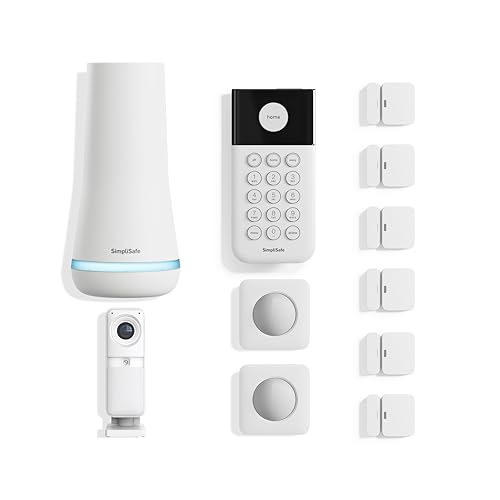
- Simple to set up. Seriously secure. Get ready to protect right out of the box. Just plug in the Base Station, place your wireless camera and sensors where you want, and start protecting your home. No wiring or drilling required.
- Complete control of your system with the SimpliSafe App - Arm, disarm and protect anytime, anywhere
- Stop crime in real time - With the Smart Alarm Wireless Indoor Camera and 24/7 live guard protection exclusively from SimpliSafe, monitoring agents can actively see and speak to intruders during an alarm through the two-way audio feature

Pros
-
Straightforward DIY setup; expands easily as your home changes
-
Optional professional monitoring, with cellular described by SimpliSafe
-
Clean “alarm system first” experience (less app clutter than camera-first ecosystems)
-
Clear 1-year limited hardware warranty policy (per SimpliSafe)
Cons
-
Best features can depend on a plan (pick a plan only if you’ll use it)
-
Smart-home automations aren’t as deep as some hubs
-
If you want one app for cameras + alarm + lights, Ring may feel simpler
Social proof: See reviews on Amazon.
Trade-offs / Who should skip
-
Skip if you want your alarm hub to double as your home Wi-Fi router (Ring Alarm Pro fits better).
-
Skip if you refuse subscriptions and want pro monitoring—those goals usually conflict.
Scores: Performance 4.5/5 • Monitoring resilience 4.5/5 • Ease of use 5/5 • Value 4/5
Ring Alarm Pro 8-Piece Kit — Best if you want security + a Wi-Fi 6 router in one box
Ring Alarm Pro’s standout is the base station: it’s an alarm hub and an eero Wi-Fi 6 router, with Ring stating up to 900 Mbps supported speeds and up to 1,500 sq ft coverage (base station alone).
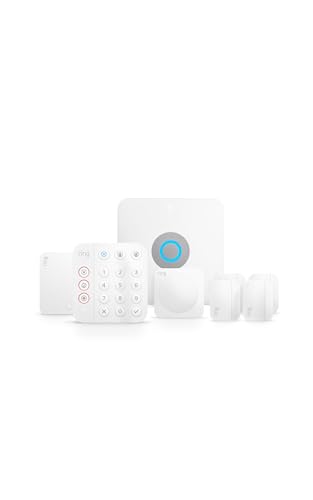
- Ring’s best home security system with built-in eero Wi-Fi 6 router to help protect against break-ins, and more. Plus, Alarm Pro ensures your connected home runs on a secure mesh wifi network.
- Customizable home protection. This kit includes one Alarm Pro Base Station, one Keypad, four Contact Sensors for windows/doors, one Motion Detector for one hallway/room, and one Alarm Range Extender. Cover more rooms and detect more threats when you add Alarm Sensors, and eero 6 extenders, all sold separately, at any time.
- Fast and secure internet. Helps keep your devices connected with reliable wifi with speeds up to 900 mbps and covers up to 1,500 sq. ft. Create a secure network with optional online threat protection.
Pros
-
Router + alarm hub reduces boxes/cables (great for small homes/apartments)
-
Strong path if you already use Ring cameras/doorbells
-
Easy to add sensors over time
-
Ring states a 1-year limited warranty for devices
Cons
-
Best experience is “Ring-ecosystem first” (less ideal for HomeKit households)
-
Router placement matters (you may need extenders in long homes)
-
Features can depend on subscriptions (decide based on what you’ll actually use)
Social proof: See reviews on Amazon.
Trade-offs / Who should skip
-
Skip if you already love your current router/mesh and don’t want to rebuild networking around the alarm hub.
-
Skip if you want the most open-ended automation hub; Abode is usually a better fit.
Scores: Performance 4.5/5 • Monitoring resilience 4/5 • Ease of use 4.5/5 • Value 4/5
Abode iota All-in-One Security Kit — Best for HomeKit-friendly smart homes
Abode is the pick I point to when smart-home compatibility matters as much as break-in sensors. The iota kit is positioned as an all-in-one gateway with a built-in camera and support for popular smart-home standards in the ecosystem.
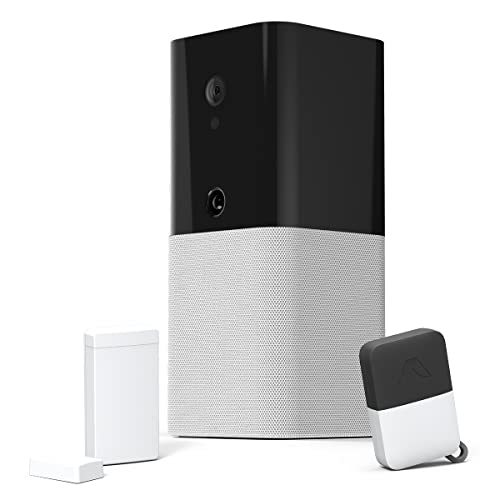
- Contract-free home security with no required monthly fees
- iota is an all-in-one device that includes a 1080p camera, motion sensor, two-way voice, and 93db siren
- Free app access to monitor and control your system from anywhere. Available in English and Spanish.
Pros
-
Strong smart-home compatibility (HomeKit/Alexa/Google are key reasons to choose it)
-
iota is an all-in-one hub with integrated camera (per Abode listing)
-
Abode notes local video storage via microSD on iota (helpful for privacy + avoiding cloud lock-in)
-
1-year hardware warranty stated by Abode
Cons
-
Abode’s best automations take time to set up (expect tinkering)
-
Not as “guided” as SimpliSafe for non-technical households
-
Older iota kit listings can vary by bundle—double-check you’re buying the right kit
Social proof: See reviews on Amazon.
Trade-offs / Who should skip
-
Skip if you want the simplest setup for parents/roommates—SimpliSafe tends to be more forgiving.
-
Skip if you want a purely no-subscription approach for everything; mixing cameras + cloud features can change the cost story.
Scores: Performance 4/5 • Monitoring resilience 3.5/5 • Ease of use 4/5 • Value 4/5
eufy Security 5-Piece Home Alarm Kit — Best if you want “no monthly fees” basics
If your goal is simple door/window + motion coverage without a required subscription, eufy’s alarm kit is built around that “one-time purchase” positioning.

- Easy Setup: Install in minutes all by yourself. The entry sensors attach to doors and windows, while the motion sensor and keypad can be secured to walls via the included mounts.
- No Monthly Fees: Designed to protect your home as well as your wallet, eufy Security products are one-time purchases that combine security with convenience.
- Instant Alerts: Get notified as soon as motion or a breach is detected with the eufy Security app.
Pros
-
eufy explicitly markets this kit as no monthly fees
-
Quick DIY setup for apartments and smaller homes
-
Battery life claims are strong for sensors/keypad (varies by usage)
-
eufy notes a 12-month hardware warranty period for eufy Security products in its policy
Cons
-
Professional monitoring is not the default story here (this is a self-monitoring-leaning kit)
-
Ecosystem depth isn’t as rich as Ring/Abode for smart-home automations
-
Camera add-ons can change the storage/subscription decisions—plan ahead
Social proof: See reviews on Amazon.
Trade-offs / Who should skip
-
Skip if you want “call center + dispatch” peace of mind as the main feature; SimpliSafe or Frontpoint is usually better.
-
Skip if you need complex multi-user rules and automations; Abode tends to win there.
Scores: Performance 3.5/5 • Monitoring resilience 2.5/5 • Ease of use 4.5/5 • Value 4.5/5
Frontpoint Fortress Package — Best for longer equipment warranty + pro monitoring focus
Frontpoint is for people who want DIY installation but still prioritize professional monitoring. Frontpoint’s own warranty policy states a 3-year warranty period and notes it applies while you’re an active customer in good standing.

Pros
-
Frontpoint states a 3-year equipment warranty (with conditions)
-
Frontpoint describes cellular connection and battery backup for the hub
-
Strong “security company” feel without needing a tech visit
-
Good path for adding life-safety sensors (smoke/heat, etc.) in bigger kits
Cons
-
Monitoring-centric approach (less ideal if you insist on self-monitoring only)
-
Typically higher ongoing cost than self-monitoring kits (even if hardware is solid)
-
More moving parts than simple starter kits
Social proof: See reviews on Amazon.
Trade-offs / Who should skip
-
Skip if you want the lowest ongoing cost and can self-manage alerts (eufy fits better).
-
Skip if you’re building an Apple HomeKit-first home and want the alarm to be your main automation brain (Abode fits better).
Scores: Performance 4/5 • Monitoring resilience 4.5/5 • Ease of use 4/5 • Value 3.5/5
Quick compare
-
Best overall: SimpliSafe (balanced setup + monitoring options)
-
Best “router + security” combo: Ring Alarm Pro (eero Wi-Fi 6 built in)
-
Best for HomeKit-friendly smart homes: Abode iota (smart-home fit + local storage option)
-
Best no-monthly-fee starter kit: eufy Alarm Kit (positioned as no monthly fees)
-
Best longer warranty + monitoring focus: Frontpoint (3-year warranty policy)
FAQs
Do I need professional monitoring?
Not always. If you’re home often and comfortable reacting to alerts, self-monitoring can work. If you travel, sleep hard, or just want someone else to handle dispatch, pro monitoring is the cleaner solution.
Will these work in an apartment?
Yes—DIY kits are usually ideal for apartments because they’re adhesive-mounted and removable. I’d look hardest at SimpliSafe, Ring Alarm Pro, or eufy depending on whether you want monitoring.
Do they work if the internet goes out?
It depends. Some systems support cellular backup or otherwise maintain monitoring connectivity in outages; for example, Ring Alarm Pro includes an eero router in the base station, and Frontpoint describes cellular + battery backup for the hub.
Can I avoid monthly fees entirely?
You can avoid monthly fees more easily with self-monitoring-first kits; eufy explicitly markets “no monthly fees” for its alarm products.
If you want professional dispatch, ongoing service is common.
As an Amazon Associate, I earn from qualifying purchases.