
Next-Gen on a Giant Screen: Best Gaming Projectors
As an Amazon Associate I earn from qualifying purchases. Some links may earn us a commission at no extra cost to you.
If you game on PS5/Series X or PC and want a 100–120″ screen, latency (ms), refresh rate support, throw distance, brightness, and fan noise matter most. Laser/LED light sources lower upkeep and noise, and 3LCD vs. DLP affects rainbow artifacts and placement flexibility.
How I researched
I compared late-2025 projector roundups and deep-dive reviews, prioritized input-lag/refresh testing and real brightness, checked throw/placement (short-throw vs. standard, lens shift), HDMI 2.1 vs. 2.0 compatibility, and noted availability/EOL shifts. I weighed gaming latency and 1080p/240Hz support first, then 4K/HDR clarity, setup flexibility, and long-term ownership (laser/LED life). This guide focuses on verified specs and real gaming trade-offs—not marketing.
Top picks
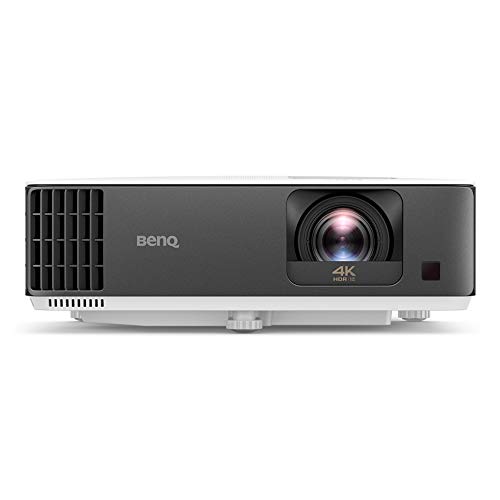
BenQ X3100i — Best overall for most gamers (4K + low-lag presets)
A bright 4LED 4K DLP with genre-tuned game modes and real lens shift—easy to place and fast enough for competitive play.
Why it wins: Excellent 1080p/240Hz response (down to ~4.2 ms) and ~16.7 ms at 4K/60, plus ~3300-ANSI brightness and vertical lens shift for painless setup.

- True 4K UHD, HDR10 + HDR-PRO: Experience games in stunning clarity & detail, this 4K gaming projector showcases every pixel with precision & vibrancy. The Best Gaming Projectors on the market. Experience razor-sharp detail and high contrast in every frame.
- Ultra-Low Latency: Experience gaming with zero latency with response times as quick as 4ms (1080p@240Hz). Built for next-gen gaming performance.
- 3300 ANSI Lumens 4LED Brightness: Achieve the ideal setup with a 40%-60% vertical lens shift and a versatile 1.3x zoom. Vivid colors and strong contrast, even in lit rooms.
Pros
-
~4.2 ms at 1080p/240Hz; ~16.7 ms at 4K/60
-
Bright 4LED light; wide color coverage
-
Useful lens shift and 1.3× zoom
-
Game-specific picture modes
Cons
-
No native 4K/120 input
-
DLP rainbow possible for sensitive eyes
Trade-offs / Who should skip
If you need 4K/120 from consoles or zero rainbow risk, see the Epson below.
Scores: Performance 4.5/5 · Latency/Refresh 4.5/5 · Ease of Use 4.5/5 · Value 4/5
Optoma UHZ35ST — Best short-throw laser (tight rooms, bright image)
A compact 4K laser that throws ~120″ from ~4.3 ft and stays fast.
Why it wins: Short-throw convenience with competitive lag: ~4.4 ms at 1080p/240 and ~17 ms at 4K/60, with ~3500 lumens and a 30,000-hour laser.

- DEPENDABLE LASER LIGHT SOURCE: DuraCore laser light technology eliminates lamp and filter replacements for up to 30,000 hours of virtually maintenance-free operation. IPX6 dust resistance rating ensures optical engine durability
- SHORT THROW LENS: Experience a 120" (10 foot) image projected from just 4' 4" away, suitable for smaller spaces and allows for easier installation
- 4K UHD RESOLUTION: Displays sharp and detailed 4K UHD (3840 x 2160) high definition content without downscaling or compression

Pros
-
~4.4 ms at 1080p/240; ~17 ms at 4K/60
-
Laser light source; low upkeep
-
Short throw; easy 100–120″ in small rooms
-
Bright enough for mild ambient light
Cons
-
No lens shift; placement matters
-
Single-chip DLP rainbow possible
Trade-offs / Who should skip
If you need flexible placement with lens shift, the BenQ X3100i fits better.
Scores: Performance 4.5/5 · Latency/Refresh 4.5/5 · Ease of Use 4/5 · Value 4/5
ViewSonic X2-4K — Best “Designed for Xbox” LED short-throw
An LED 4K projector tuned for Xbox with living-room-friendly noise.
Why it wins: Certified “Designed for Xbox,” supports up to 240 Hz at 1080p with response as low as ~4.2 ms; ~33 ms at 4K/60 is fine for RPG/adventure.

- SUPERSIZED MOVIES AND GAMES: Up to 4K UHD (3840x2160p) LED projector with bright 2000 lumens and short throw lens
- ULTIMATE GAMING EXPERIENCE: Designed for Xbox with a 4.2ms response time and up to 240Hz refresh rate to ensure ultra-smooth gaming experiences
- EASY SETUP: 0.69-0.83 short throw ratio, 1.2x optical zoom, vertical/horizontal keystone correction, and 4-corner adjustment for a flexible and portable setup
Pros
-
Xbox-certified experience; smooth console setup
-
1080p/240Hz low-lag gaming; LED longevity
-
Short-throw; 100″ from roughly 5 ft
-
Lower fan noise in Eco
Cons
-
~33 ms at 4K/60; not for twitch shooters
-
~2000 ANSI lumens; prefers dim rooms
Trade-offs / Who should skip
Serious competitive FPS players should favor the TK700STi or UHZ35ST.
Scores: Performance 4/5 · Latency/Refresh 4.5/5 · Ease of Use 4.5/5 · Value 4/5
Epson Home Cinema LS11000 — Best for 4K/120 and no-rainbow gaming
Laser 3LCD with HDMI 2.1, 4K/120 support, and no DLP rainbow artifacts.
Why it wins: Accepts uncompressed 4K/120 via HDMI 2.1 with input lag typically under ~20 ms, plus excellent placement flexibility and lens memory.

- 4K Display Technology¹ — Produces a full 8.29-million-pixel on-screen image for exceptional picture clarity without sacrificing brightness
- High Picture Brightness — Unique 3-Chip 3LCD projection engine powered by a laser array light source produces 2,500 Lumens of Color Brightness (IDMS Rated) and 2,500 Lumens of White Brightness (ISO Rated)³
- Advanced HDR10+ Capability — Full 10-bit color processing for HDR, HDR10², HDR10+² and HLG content, including Epson Precision 16-step real-time HDR picture adjustment
Pros
-
4K/120 input; sub-20 ms class lag
-
3LCD: no rainbow artifacts
-
Laser light; motorized lens shift
-
Strong HDR tone mapping for cinema
Cons
-
Larger chassis; needs ceiling space
-
Not as fast as 240 Hz DLPs
Trade-offs / Who should skip
If you mainly play competitive shooters at 1080p/240, a fast DLP feels snappier.
Scores: Performance 4.5/5 · Latency/Refresh 4/5 · Ease of Use 4/5 · Value 3.5/5
BenQ TK700STi — Best budget-minded low-lag 4K
A proven short-throw 4K DLP that still sets the pace for latency per dollar.
Why it wins: ~4 ms at 1080p/240 and ~16 ms at 4K/60, with a 100″ image at ~6.5 ft—great for bedrooms, dorms, and LANs.
- TK700 vs TK700STi: TK700STi possesses short-throw capabilities able to project at shorter distances (100"at 6.5ft) and also has an Android TV Dongle. TK700 utilizes standard throw (100" at 8.2ft).
- 4K LOW LATENCY: Low latency 16ms at 4K/60Hz low input lag, Game Mode/Game Sound Mode to fine-tune audio and images. One of our Best Gaming projectors.
- PRO PERFORMANCE: This 4K Projector is compatible with major consoles (Sony PS4, PS5, Nintendo Switch, and Xbox Series X, Google stadia) huge, bright, sharp images and equalized audio
Pros
-
Class-leading latency for the money
-
Short-throw; easy big screen close-up
-
Android TV streaming included
-
Lightweight; simple to move
Cons
-
Lamp light source; periodic replacements
-
No lens shift; careful placement needed
Trade-offs / Who should skip
If you want laser/LED longevity or quieter fans, consider X2-4K or UHZ35ST.
Scores: Performance 4/5 · Latency/Refresh 5/5 · Ease of Use 4/5 · Value 4.5/5
Quick compare
-
BenQ X3100i — Best overall: bright 4LED, lens shift, 4.2 ms at 1080p/240; no 4K/120.
-
Optoma UHZ35ST — Best short-throw laser: ~3500-lm laser, ~4.4 ms at 1080p/240; no lens shift.
-
ViewSonic X2-4K — Best Xbox setup: 1080p/240 at ~4.2 ms; ~33 ms at 4K/60.
-
Epson LS11000 — Best 4K/120 & no-rainbow: 3LCD laser, HDMI 2.1; slower than 240 Hz DLPs.
-
BenQ TK700STi — Best budget low-lag 4K: ~4 ms at 1080p/240; lamp-based, no lens shift.
Buying guide
Pick by latency first. If you’re competitive, prioritize 1080p/240Hz modes with ≤5 ms (X3100i, TK700STi, UHZ35ST). If you prefer cinematic 4K but still game, sub-20 ms at 4K/60 feels fine for most genres (X3100i, UHZ35ST). If you want true 4K/120, you need HDMI 2.1 acceptance (LS11000).
Match throw to your room. Short-throw models make 100–120″ from ~4–6.5 ft (UHZ35ST, TK700STi, X2-4K). Standard-throw needs more distance but often adds lens shift and more placement flexibility (X3100i, LS11000).
Choose your light source. Laser/LED = quieter, instant-on, 20k–30k-hour life (UHZ35ST, X2-4K, LS11000). Lamps can be cheaper upfront but need replacements (TK700STi).
Hate rainbow? Pick 3LCD (Epson). Single-chip DLP can show color-fringing to sensitive viewers.
Noise & brightness. If you game with lights on, target ~3000+ ANSI lumens (X3100i ~3300; UHZ35ST ~3500). For darker rooms, LED options are fine and quieter.
FAQs
Q: Do these support 4K/120 from PS5/Series X?
A: LS11000 accepts 4K/120 over HDMI 2.1. The BenQ/Optoma/ViewSonic DLPs top out at 4K/60 but support 1080p at up to 240 Hz for ultra-low latency.
Q: What about input-lag numbers—are they real?
A: They’re manufacturer-reported and corroborated by reputable reviewers where available; real-world feel lines up with the specs for these models.
Q: Any safety/certification notes?
A: UL/ETL listings for these exact variants weren’t clearly published—couldn’t verify. Follow each manual’s ventilation and mounting guidance.
As an Amazon Associate, I earn from qualifying purchases.