
Top Wireless Gaming Headsets: Low-Latency Picks for PC & Console
As an Amazon Associate, I earn from qualifying purchases. Some links may earn us a commission at no extra cost to you.
Wireless headsets live or die by latency + connection stability, so that’s the main thing I prioritized (because even “great sound” feels bad if it’s out of sync or drops mid-match). I compared recent headset roundups and deep-dive tests, cross-checked spec sheets (battery, connections, platform support), noted model/variant traps (Xbox vs PlayStation versions), and weighed performance vs long-term ownership friction (comfort, replaceables, software, support).
Top picks
Audeze Maxwell 2 — Best for audiophile sound without gaming-lag headaches
If you want top-tier sound that still behaves like a “real” gaming headset (low-latency dongle + strong mic), this is the one I’d start with.
Why it wins: Planar-style detail + low-latency wireless + strong mic performance.
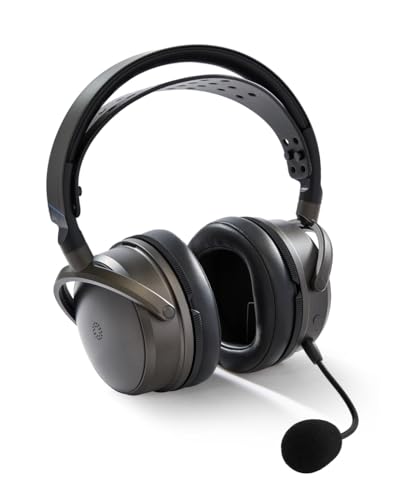
- 80 hours of battery life*
- NEW: Patent-pending SLAM technology (like from our LCD-S20 and CRBN2 models), which produces heightened spatial immersion and precision along with punchier bass response.
- Bluetooth 5.3 technology including LE Audio and LDAC for versatile connectivity with mobile devices.
Pros
- Low-latency dongle wireless for gaming sync
- Excellent battery life class
- Great mic noise handling
Cons
- Heavier than most; can fatigue on long sessions
- Isolation isn’t great for loud rooms
Who should skip (failure cases)
- If you hate heavy headsets (comfort will matter more than sound).
- If you need strong passive isolation or ANC for noisy commutes.
Scores: Performance 5/5 • Latency/Stability 5/5 • Ease of Use 4/5 • Value 4/5
SteelSeries Arctis Nova Pro Wireless — Best for multitasking (PC/console + Bluetooth + ANC)
This is the “I game, I Discord, I take calls, I swap devices” pick.
Why it wins: Base-station flexibility (plus Bluetooth) + low-latency gaming link.
No products found.
Pros
- Very low latency via the wireless base
- Bluetooth support for phone/secondary device use
- Strong “hub” style setup for multi-device desks
Cons
- ANC is only “passable” vs true ANC headphones
- Variant confusion (Xbox vs PlayStation versions)
Who should skip (failure cases)
- If you want serious ANC for travel (this isn’t that).
- If you don’t want a base station on your desk.
Scores: Performance 4/5 • Latency/Stability 5/5 • Ease of Use 4/5 • Value 4/5
Logitech G Astro A50 X — Best for switching between consoles (HDMI passthrough setup)
If you bounce between PS5/Xbox/PC and want a “dock” that makes switching painless, A50 X is built for that workflow.
Why it wins: Multi-system switching convenience (including HDMI passthrough).
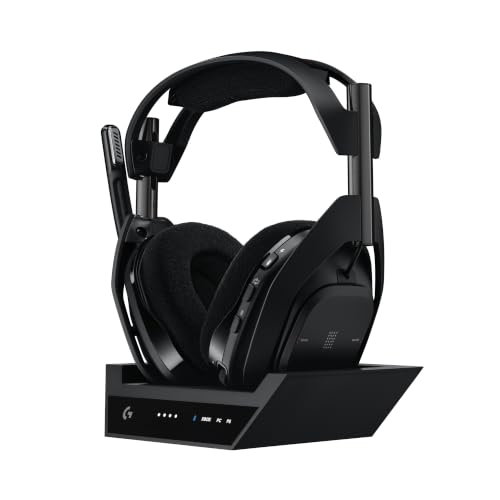
- PLAYSYNC Simultaneous Multi-System: Xbox + PS5 + PC all at once. These gaming headphones let you stay connected to all your platforms and tap between them with on-ear controls
- Broadcast-quality Mic: Use this PC headset to sound like a pro; 48 kHz full-bandwidth LIGHTSPEED mic uplink achieves new levels in wireless boom mic quality
- State-of-the-art HDMI 2.1 Passthru: Delivers Ultra HD resolution for the highest levels of console audio (24 bit) and visual fidelity (4K 120 Hz)

Pros
- Designed around multi-platform switching
- Dock-style experience for desk/TV setups
- Premium “living room + desk” friendly concept
Cons
- Battery life is more “daily charging” than marathon-weekend
- Base station footprint isn’t for minimal desks
Who should skip (failure cases)
- If you mostly play on one platform and don’t need the switching perks.
- If you want the longest battery life possible.
Scores: Performance 4/5 • Latency/Stability 4/5 • Ease of Use 4/5 • Value 3/5
Razer BlackShark V2 Pro (2023) — Best for competitive FPS voice clarity
This is the pick I’d lean toward when mic clarity and “get out of my way” comfort matter more than fancy base stations.
Why it wins: Competitive-friendly wireless + strong mic performance.

- RAZER HYPERCLEAR SUPER WIDEBAND MIC — By covering a wider frequency range of sound, this next-gen detachable mic captures an incredible amount of detail in your voice, so that every shotcall to your team sounds clear, rich, and natural.Impedance: 32 Ω.Frequency response: 100 Hz – 10 kHz.Pick-up Pattern : Unidirectional.
- RAZER TRIFORCE TITANIUM 50MM DRIVERS — With titanium-coated diaphragms for added clarity, our new, cutting-edge proprietary design divides the driver into 3 parts for the individual tuning of highs, mids, and lows—producing brighter, clearer audio with richer highs and more powerful lows.
- RAZER HYPERSPEED WIRELESS TECHNOLOGY — With its industry-leading 2.4GHz wireless connection, enjoy high-performance, low-latency competitive play with sound that’s perfectly synced to your game.
Pros
- Low-latency wireless dongle
- Strong overall mic performance
- Long battery life class
Cons
- Not usable on Xbox consoles
- No ANC; weak isolation for travel/noisy spaces
Who should skip (failure cases)
- If you need Xbox wireless support.
- If you want wired fallback (this model is wireless-only).
Scores: Performance 4/5 • Latency/Stability 5/5 • Ease of Use 5/5 • Value 4/5
HyperX Cloud III Wireless — Best for battery + comfort value
If you want a set-it-and-forget-it wireless headset with huge battery life, this one is the battery-first value play.
Why it wins: Long battery + comfort-first fit for everyday gaming.

- Up to 120 hours of Battery Life: Put on the Cloud III Wireless and you might not have to charge again for weeks. Enjoy up to 120 hours of battery life for gaming, watching anime, or chatting on a single charge.
- Comfort is King: Comfort’s in the Cloud III’s DNA. HyperX signature memory foam in the headband and ear cushions wrapped in soft, premium leatherette make for a plush, comfortable fit all around.
- Audio Tuned for Your Entertainment: Angled 53mm drivers have been tuned by HyperX audio engineers to provide an optimized listening experience that accents the dynamic sounds of gaming.
Pros
- Very long rated battery life class
- Comfort-focused design direction
- Simple, stable wireless for everyday gaming
Cons
- Not the most “pro-grade” mic vs top-tier options
- Feature set is simpler than premium base-station models
Who should skip (failure cases)
- If you want the absolute best microphone processing and background rejection.
- If you need multi-device simultaneous mixing (look at Nova Pro Wireless instead).
Scores: Performance 4/5 • Latency/Stability 4/5 • Ease of Use 5/5 • Value 5/5
Quick compare
- Best sound + still “gaming-fast”: Audeze Maxwell 2
- Best multi-device desk setup: SteelSeries Arctis Nova Pro Wireless
- Best for multiple consoles: Astro A50 X
- Best competitive mic focus: Razer BlackShark V2 Pro (2023)
- Best battery value: HyperX Cloud III Wireless
Buying guide
- If you play competitive shooters: prioritize 2.4GHz dongle “low latency” over Bluetooth.
- If you’re on Xbox: double-check the Xbox-specific variant before buying.
- If you swap PC + console + phone a lot: look for base station / hub + Bluetooth.
- If comfort is your #1: avoid heavier sets (Maxwell 2 is excellent, but weight is the trade-off).
- If you hate charging: Cloud III Wireless is the battery-first play.
FAQs
Are Bluetooth gaming headsets “good enough”?
For casual gaming, often yes—but for competitive play, a 2.4GHz dongle is usually the safer choice for sync and stability.
Do I need “surround sound” features?
Not necessarily. Many players do well with good stereo imaging; virtual surround is optional and very game-dependent.
What’s the biggest “gotcha” when buying?
Buying the wrong console variant (especially for Xbox compatibility). Always confirm the exact model/edition before you check out.
As an Amazon Associate, I earn from qualifying purchases.