
Best External GPU for laptops
As an Amazon Associate I earn from qualifying purchases. Some links may earn us a commission at no extra cost to you.
If your laptop’s GPU is holding back your games or creative apps, an external GPU (eGPU) can be a nice middle ground between “keep suffering” and “buy a whole new PC.” What really matters here is: Thunderbolt/USB4 support, power delivery, how big a GPU the box can handle, and whether you want an enclosure you upgrade yourself or an all-in-one box with a GPU built in.
Top picks
1. Razer Core X V2 — Best for future-proof Windows laptops & handhelds
A next-gen enclosure for Thunderbolt 4/5 and some USB4 devices where you want max flexibility to reuse GPUs and power supplies over time.
Why it wins: It’s one of the few mainstream eGPU boxes built for Thunderbolt 5-class bandwidth and standard ATX PSUs, so you can pair it with modern desktop GPUs and upgrade both later.

- NVIDIA & AMD DESKTOP GPU READY — Designed to fit PCIe desktop graphics cards up to 4 slots wide, give any compatible laptop a massive boost in power by connecting the latest NVIDIA GeForce and AMD Radeon GPUs (GPU & power supply not included)
- NEXT-GEN THUNDERBOLT 5 PERFORMANCE — Featuring an ultra-fast bandwidth of up to 80 Gbps, enjoy the smoothest performance with a Thunderbolt 5 connection that easily manages the most demanding creative apps and AAA games
- MULTI-DEVICE COMPATIBILITY — From Thunderbolt 4 and Thunderbolt 5 laptops to USB 4 gaming handhelds, integrate the Razer Core X V2 to seamlessly turn compatible devices into gaming or creative powerhouses instantly

Pros
-
Thunderbolt 5, works with TB4 and some USB4 hosts
-
Fits huge, up-to-4-slot full-length GPUs
-
Uses standard ATX PSUs you can choose/upgrade
-
Up to 140W laptop charging over USB-C
Cons
-
No PSU included; adds to total project cost
-
Windows-only; eGPUs not supported on M-series Macs
-
No extra USB or Ethernet hub built in
Social proof
Owners like that they can drop in a desktop-class PSU and GPU they already own, then upgrade either piece later without replacing the whole box. Early reviewers also highlight the roomy interior for 3–4-slot modern cards. See reviews on Amazon for specific GPU and laptop pairings.
Trade-offs / Who should skip
-
Great if: You’re on Windows 11 with a laptop or handheld that has Thunderbolt 4/5 or USB4 with eGPU support, and you like reusing/upgrading desktop GPUs and PSUs over time.
-
Skip if: You want something that already includes a GPU, or you’re on a MacBook with Apple silicon—modern Macs with M-series chips don’t support eGPUs.
Scores: Performance 4.5/5 · Upgrade Flexibility 5/5 · Ease of Use 4/5 · Value 4/5
2. Razer Core X — Best simple enclosure with built-in PSU
A proven Thunderbolt 3 eGPU box with a built-in 650W PSU and 100W laptop charging that still works great with many TB3/TB4 Windows laptops and supported Intel Macs.
Why it wins: Unlike the V2, the classic Core X has its power supply included and tuned for eGPU use, which makes the whole project simpler if you don’t want to pick a PSU.
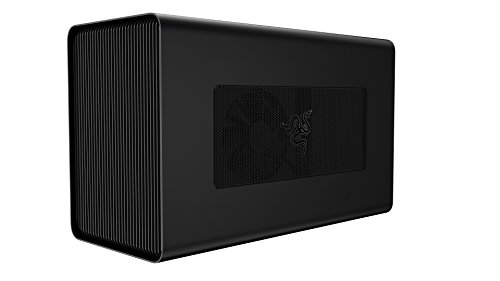
- Desktop Grade Performance: Boosts Thunderbolt 3 laptop performance with support for up to 3 slot wide PCIe full sized desktop graphics cards
- Built-In Power Supply: Includes a 650W ATX PSU with 100W laptop charging via Thunderbolt 3
- Compatibility (Windows): Requires Thunderbolt 3 external graphics (eGPU) support with RS45 or later and compatible NVIDIA or AMD graphics cards
Pros
-
650W internal PSU sized for gaming GPUs
-
Up to 100W laptop charging via Thunderbolt 3
-
Supports up-to-3-slot, full-length GPUs
-
Official support for many Intel Mac + AMD GPU combos
Cons
-
Thunderbolt 3 only; no TB5 bandwidth boost
-
No USB/Ethernet ports—graphics only
-
Not supported for eGPU on Apple silicon Macs
Social proof
This is one of the most widely used eGPU enclosures, especially for older gaming and creator laptops. Many users praise its “install once and forget it” feel and solid stability over time. See reviews on Amazon for experiences with specific laptops and graphics cards.
Trade-offs / Who should skip
-
Great if: You want a straightforward enclosure with a PSU included for a TB3/TB4 Windows laptop, or you’re on an Intel MacBook Pro/iMac Pro using a supported AMD GPU.
-
Skip if: You’re planning around Thunderbolt 5/USB4 handhelds, or you want an eGPU box that doubles as a USB/Ethernet dock.
Scores: Performance 4.5/5 · Upgrade Flexibility 4/5 · Ease of Use 4.5/5 · Value 4/5
3. Sonnet eGPU Breakaway Box 750ex — Best for creators & dock-style setups
A 750W Thunderbolt 3 eGPU enclosure with extra USB ports and Ethernet, aimed at gamers and creative pros who want a single-cable desk.
Why it wins: It blends a high-headroom PSU with dock-like connectivity—four USB-A ports and Gigabit Ethernet—so one cable can handle GPU, peripherals, and network.

- Boosts Graphics Performance - Connects a high-performance GPU card to your computer with Thunderbolt 3 ports. Mac & Windows Compatible. **M1 Macs are NOT compatible with GPUs.
- Cuts Application Task Times - Enables GPU acceleration to significantly improve editing, rendering, color grading, animation, and special effects performance.
- 750W Power Supply - Support the power requirements of the latest compatible GPU cards; future-proof design handles higher power requirements of cards to come.
Pros
-
750W PSU; supports very power-hungry GPUs
-
Up to 85W laptop charging over Thunderbolt
-
4× USB-A plus Gigabit Ethernet on the back
-
Designed for both gaming and pro workloads
Cons
-
Bigger and heavier than basic enclosures
-
Thunderbolt 3, not TB5; bandwidth remains limited
-
Best experience is on Windows or Intel-based Macs
Social proof
This box is popular with editors and 3D artists who want their eGPU to double as a small dock. Users often mention quieter operation than expected and solid long-session stability in apps like Premiere Pro and DaVinci Resolve. Check reviews on Amazon for reports from people in similar workflows.
Trade-offs / Who should skip
-
Great if: You’re a video editor, 3D artist, or colorist on a Thunderbolt-equipped Windows machine (or Intel Mac with supported GPUs) and want a GPU box that also acts as your USB/Ethernet hub.
-
Skip if: You don’t care about the extra ports and just want a cheaper, simpler enclosure (like the Razer Core X), or you’re chasing maximum TB5 bandwidth for a future laptop (Core X V2).
Scores: Performance 4.5/5 · Upgrade Flexibility 4.5/5 · Ease of Use 4/5 · Value 4/5
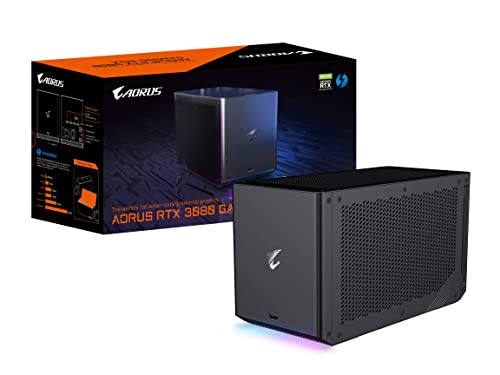
4. Gigabyte AORUS RTX 3080 Gaming Box — Best all-in-one 1440p/4K eGPU
A fully built eGPU with a GeForce RTX 3080 already installed, plus watercooling, Thunderbolt 3, USB ports, Ethernet, and laptop charging—just plug it in and game.
Why it wins: You don’t have to choose a GPU, PSU, or cables—it’s an all-in-one RTX 3080 box tuned by Gigabyte, with strong 1440p and solid 4K gaming performance for many laptops.
Pros
-
Includes RTX 3080 10GB GPU out of the box
-
Water-cooled design helps with temps and noise
-
Thunderbolt 3 with plug-and-play connection
-
Extra USB ports and Ethernet for one-cable docking
Cons
-
GPU is not meant to be user-swapped easily
-
Limited by TB3 bandwidth vs a desktop PCIe slot
-
Needs a decently strong laptop CPU to shine
Social proof
Owners like that this feels like “desktop FPS in a shoebox” for thin-and-light laptops. Many note that noise levels stay reasonable under load thanks to the liquid cooling, and setup is mostly just plug in, install drivers, and go. Check reviews on Amazon for real-world FPS with your favorite games.
Trade-offs / Who should skip
-
Great if: You want a plug-and-play gaming upgrade for a TB3/TB4 Windows laptop and don’t want to source your own GPU or PSU.
-
Skip if: You care a lot about long-term upgrade flexibility—you can’t just toss in a next-gen GPU later—and if you have a weaker CPU, the 3080 may be bottlenecked.
Scores: Performance 4.5/5 · Upgrade Flexibility 2.5/5 · Ease of Use 4.5/5 · Value 4/5
5. Gigabyte AORUS RTX 4090 Gaming Box — Best no-compromise 4K & AI powerhouse
A wild but amazing all-in-one eGPU: a water-cooled GeForce RTX 4090 with its own high-wattage PSU, Thunderbolt 3, USB ports, Ethernet, and laptop charging.
Why it wins: If you’re doing 4K high-refresh gaming, heavy 3D, or AI workloads on a strong laptop and budget isn’t the main limit, this is one of the most powerful external GPU boxes available.

- Powerful GeForce RTX 4090 delivers incredible performance for games, creators and A.I.
- WATERFORCE all-in-one cooling system
- Thunderbolt 3 plug and play
Pros
-
Fully built RTX 4090 eGPU with 24GB VRAM
-
Water-cooled with 240mm radiator for lower noise
-
Thunderbolt 3 plug-and-play, plus USB and Ethernet
-
High-wattage PSU sized specifically for the 4090
Cons
-
Physically large and heavy; best as a stay-put box
-
Very demanding on laptop CPU; many systems bottleneck
-
Upgrade flexibility is low; not standard GPU/PSU parts
Social proof
Reviewers regularly call this “desktop-tier performance in a box” and note that, as long as your CPU is strong enough, you can get insane ray-tracing and AI performance from a thin-and-light laptop. The main caveat people mention is that many midrange CPUs can’t fully feed a 4090.
Trade-offs / Who should skip
-
Great if: You’re a creator or gamer with a top-tier TB3/TB4 Windows laptop (or compact PC) and you know you can use RTX 4090-level performance—for example, in 4K editing, 3D rendering, or AI workloads.
-
Skip if: Your laptop CPU is midrange, you mostly play at 1080p, or you don’t want a giant box parked on your desk. For most people, the RTX 3080 Gaming Box or an enclosure plus a midrange GPU is a better match.
Scores: Performance 5/5 · Upgrade Flexibility 2/5 · Ease of Use 4/5 · Value 3/5
Quick compare
-
Razer Core X V2 — Best for future-proof setups: Thunderbolt 5 and ATX PSU support; fantastic flexibility, but you must provide your own PSU and GPU and it’s Windows-only.
-
Razer Core X — Best simple enclosure with PSU: Built-in 650W PSU and 100W charging; ideal for TB3/TB4 Windows and some Intel Macs, but no extra ports.
-
Sonnet eGPU Breakaway Box 750ex — Best for creators & docking: 750W PSU plus USB/Ethernet hub; perfect as a one-cable workstation dock, but bigger and TB3-only.
-
AORUS RTX 3080 Gaming Box — Best all-in-one 1440p/4K option: GPU and cooling included; no tinkering required, but GPU isn’t really upgradeable.
-
AORUS RTX 4090 Gaming Box — Best “money no object” box: Massive 4K/AI performance in an external box, but overkill for many and not very upgradable.
FAQs
Q: Will an external GPU work with any USB-C laptop?
A: No. You usually need Thunderbolt 3, 4, or 5, or USB4 with eGPU support. A basic USB-C port that only carries USB data and display output is not enough. Always check your laptop’s spec sheet or manual for “Thunderbolt” and “external graphics” support.
Q: How much performance do you lose vs a desktop GPU?
A: Because Thunderbolt has less PCIe bandwidth than a desktop x16 slot, you’ll usually see a performance hit, often somewhere around 10–25% depending on the game/app, GPU, and whether you use an external monitor. You’ll almost always get better results running your games on a monitor plugged into the eGPU, not the laptop’s internal screen.
Q: Can I use these with a MacBook?
A: It depends on the Mac:
-
Intel-based Macs with Thunderbolt 3: Many can use eGPUs with supported enclosures and AMD GPUs.
-
Apple Silicon (M-series) Macs: They don’t support external PCIe GPUs; you’re limited to the built-in GPU.
-
If you’re on a MacBook and eGPU is important to you, double-check Apple’s eGPU support page and your specific Mac model before buying anything.
As an Amazon Associate, I earn from qualifying purchases.