
Best iPad Keyboards – Updated Monthly
As an Amazon Associate, I earn from qualifying purchases. Some links may earn us a commission at no extra cost to you.
The right iPad keyboard depends on your exact tablet model, where you usually type, and whether you need a trackpad, protective case, or laptop-style hinge. A keyboard case creates a more integrated setup, while a standalone or folding keyboard can work across several devices and take up less room in a travel bag.
Compatibility is the most important consideration. Two iPads with similar screen sizes may have different dimensions, camera cutouts, connector positions, or magnetic layouts, so always confirm the model name and model number before ordering.
Top Picks
1. ESR Shift Series Keyboard Case — Best Overall for iPad A16 and 10th Generation
The ESR Shift Series is designed for the iPad A16 11-inch and the 10th-generation 10.9-inch iPad. It combines a detachable magnetic keyboard with a large click-anywhere trackpad, backlit keys, and support for both portrait and landscape positioning. The removable design allows the protected iPad to be separated from the keyboard when reading, drawing, or watching video. It is more versatile than a fixed laptop-style hinge, although the multi-part construction adds more bulk than a basic folio.
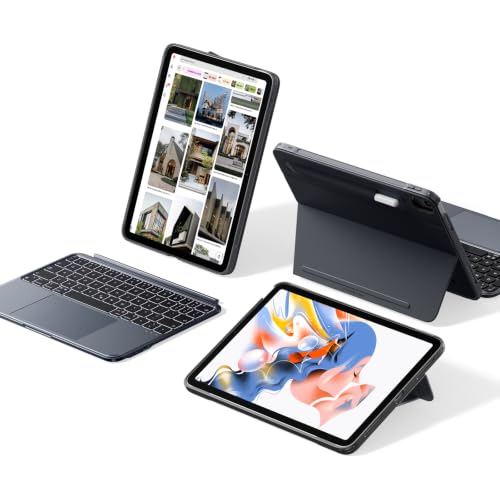
- Compatibility: only for iPad 11" (A16) 2025, iPad 10th Gen 2022; Models A2696, A2757, A2777, A3162, A3354, A3355, A3356
- Magnetic Detachable Design: a secure magnetic connection lets you attach the keyboard for typing or remove it for a streamlined tablet experience—perfect for reading, watching, or drawing; instantly transform your iPad into a laptop and back again
- Ultimate Flexibility: effortlessly switch between portrait and landscape modes for work, study, or entertainment; the adjustable landscape stand (20°–75°) adapts to your perfect viewing angle, while the sturdy 20° low-angle magnetic support is ideal for writing or drawing; detach into single-case mode for gaming—enjoy unmatched versatility, unlike fixed designs
Pros
- Large click-anywhere trackpad
- Detachable magnetic keyboard
- Supports portrait and landscape positioning
- Backlit keys for dim environments
Cons
- Bulkier than a slim folio
- Intended only for specific standard-iPad models
Who should buy it: iPad A16 and 10th-generation owners who want a flexible keyboard case for typing, drawing, and media use.
2. Nillkin Rugged Keyboard Case — Best for Older 10.2-Inch iPads
This Nillkin keyboard case is designed for the 7th-, 8th-, and 9th-generation 10.2-inch iPad. It includes a detachable keyboard, integrated trackpad, seven-color backlighting, portrait and landscape modes, and a protective case with a sliding camera cover. The more defensive construction makes it a practical choice for school, commuting, or shared family use. Its rugged design adds weight and thickness, so it is less appealing to buyers who primarily want the lightest possible typing setup.

- MILITARY-GRADE PROTECTION — YOUR iPad WALKS AWAY — We dropped this case. Off dorm beds. Out of backpacks onto concrete. Off kitchen counters mid-recipe. 1.2-meter drop tested and it keeps going. The corner air-cushion bumpers take the hit before your screen knows what happened. A heavy-duty TPU frame and reinforced polycarbonate back wrap your iPad in protection that actually earns the word "rugged." Stain-resistant faux leather wipes clean after pizza night, coffee spills, art projects, or a full day on campus. The sliding camera cover slides open when you need it and stays shut when you don't, keeping your lens protected and your privacy intact.
- PRECISION FIT — CHECK YOUR MODEL IN SECONDS — Compatible with iPad 9th Gen 2021 (A2602/A2603/A2604/A2605), iPad 8th Gen 2020 (A2270/A2428/A2429/A2430), and iPad 7th Gen 2019 (A2197/A2200/A2198). Find your model on the back of your iPad or in Settings > General > About, then tap Model Number.
- 4-IN-1 MODES — ONE CASE DOES EVERYTHING — Laptop Mode: keyboard connected, kickstand up — type essays, take notes in class, get work done. Drawing Mode: kickstand at a low angle, Apple Pencil in hand — sketch, annotate slides, doodle between lectures. Stand Mode: upright in landscape or portrait — stream shows, video call friends, follow recipes hands-free. Tablet Mode: keyboard off — read textbooks, browse social media, game on the couch. Four modes. One case. Zero swapping.
Pros
- Protective case with camera cover
- Detachable backlit keyboard
- Integrated trackpad
- Portrait and landscape viewing modes
Cons
- Heavier than a simple keyboard folio
- Limited to older 10.2-inch iPad generations
Who should buy it: Owners of a 7th-, 8th-, or 9th-generation iPad who prioritize protection and trackpad control.
3. runelk Magnetic Keyboard Case for iPad Pro 13-Inch — Best Affordable Floating-Style Keyboard
The runelk keyboard case uses a floating cantilever-style design for compatible 13-inch iPad Pro M4 and M5 models. It combines magnetic attachment, backlit keys, and a Multi-Touch trackpad in a form that resembles a compact laptop. The adjustable hinge requires less space behind the iPad than a kickstand case and can be more convenient on a lap. It uses a rechargeable wireless keyboard rather than Apple’s Smart Connector, and the floating design provides less edge protection than a rugged case.
No products found.
Pros
- Floating laptop-style design
- Backlit keyboard
- Integrated Multi-Touch trackpad
- More affordable than many first-party alternatives
Cons
- Requires separate charging and wireless pairing
- Provides limited edge protection
Who should buy it: Compatible 13-inch iPad Pro owners who want a floating keyboard design without paying first-party accessory pricing.
4. ZAGG Pro Keys with Trackpad — Best Protective Keyboard for Large iPads
The ZAGG Pro Keys combines a detachable Bluetooth keyboard with an integrated trackpad, adjustable stand, and protective case. This configuration is intended for compatible 12.9-inch iPad Pro models and the 13-inch iPad Air. Backlit laptop-style keys support typing in dim rooms, while multi-device pairing allows the keyboard to switch between compatible devices. Its case offers more protection than most floating magnetic keyboards, but the complete setup is comparatively bulky and requires periodic charging.

- Bluetooth Trackpad - Bluetooth-integrated trackpad is compatible with iPadOS and can be turned on and off.
- Detachable Keyboard and Case - The keyboard and case detach to accommodate different uses and environments.
- Backlit, Laptop-style Keys - Pro Keys have clean, precise keystrokes. Backlighting, in seven different colors, makes typing easy in low-light conditions.
Pros
- Detachable backlit keyboard
- Integrated trackpad
- Protective case with stylus storage
- Multi-device Bluetooth pairing
Cons
- Bulky compared with slim folios
- Keyboard battery requires charging
Who should buy it: Large-iPad owners who want substantial protection, a trackpad, and the flexibility of a detachable keyboard.
5. MEETION Foldable Bluetooth Keyboard — Best for Travel
The MEETION keyboard folds into a smaller package for transportation and opens into a fuller typing layout with an integrated touchpad and numeric keypad. It can connect to compatible iPads, phones, tablets, and computers, making it more versatile than a model-specific keyboard case. The numeric section is particularly useful for spreadsheets, budgeting, and data entry while traveling. It does not protect or hold the iPad itself, so users will need a separate case or stand, and a folding keyboard may not feel as rigid as a conventional desktop model.
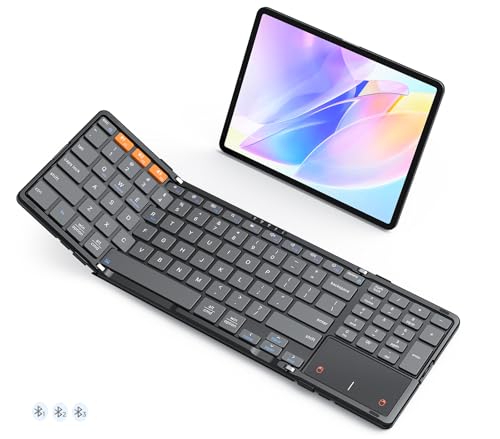
- 【TRACKPAD & NUMBER PAD IN ONE】This foldable keyboard features a built-in numeric keypad and touchpad. The multi-touch touchpad supports common gestures such as scrolling and tapping, allowing you to control your device without a mouse. The numeric keypad significantly boosts productivity when working with Excel spreadsheets, entering passwords, or replying to emails. This all-in-one design eliminates the need for a separate mouse or numeric keypad, making it ideal for office, travel, and mobile work scenarios.
- 【STABLE FLAT TYPING ANYWHERE】Unlike ordinary folding keyboards that tend to fold up easily and fail to stay flat, this keyboard features metal support bars on both sides. Once the latches are securely fastened, the keyboard remains rigid and flat. Measuring 7.87 × 4.84 × 0.67 inches and weighing 0.87 lb, it offers a stable yet portable design for use on the sofa, your lap, or other surfaces, with no accidental folding, curling, deformation, or wobbling.
- 【FULL-SIZE SCISSOR-SWITCH KEYS】This portable keyboard features a standard 96-key QWERTY layout, complete with an integrated touchpad, numeric keypad, and a full row of shortcut keys, ensuring efficient and convenient operation. The X-shaped scissor-switch mechanism delivers a quiet, smooth, and precise typing experience.
Pros
- Foldable travel design
- Integrated touchpad and numeric keypad
- Works with several device types
- Full-size layout when opened
Cons
- Does not include an iPad stand or protective case
- Folding construction may flex more than a rigid keyboard
Who should buy it: Travelers, remote workers, and spreadsheet users who want one portable keyboard for an iPad and other devices.
6. Belkin Pro Keyboard Case with Magnetic Stand — Best Bluetooth Keyboard Case for iPad Air
The Belkin Pro Keyboard Case combines a backlit Bluetooth keyboard with a large click-anywhere trackpad and a magnetic adjustable stand. This supplied configuration is intended for compatible 10.9-inch iPad Air models and pre-M4 11-inch iPad Pro generations. Multimedia shortcuts, gesture support, and Apple Pencil storage make it a practical productivity case. Because it relies on Bluetooth rather than the Smart Connector, it requires pairing and occasional charging, and buyers must carefully confirm compatibility with their exact iPad generation.

- BACKLIT BLUETOOTH KEYBOARD WITH AUTO WAKE: Backlit keys allow you to enhance your productivity so there's no guessing when working in darker spaces. Plus, auto wake lets you get right to it after opening the folio without the need to touch around.
- MULTI-GESTURE CONTROLS: With our Pro Keyboard Case, you can turn your iPad to a laptop with the same functions you’re used to using on a Mac. Scrolling and navigating on your touchpad are just as easy as if you were on your computer.
- LARGE, CLICK-ANYWHERE TRACKPAD: This ergonomic trackpad ensures you never miss a click as you work in comfort, while some devices offer a smaller, less ergonomic trackpad that can hinder comfort and productivity.
Pros
- Backlit keyboard with multimedia shortcuts
- Large click-anywhere trackpad
- Adjustable magnetic stand
- Integrated Apple Pencil storage
Cons
- Requires Bluetooth pairing and charging
- Does not fit every 11-inch iPad generation
Who should buy it: Owners of a compatible iPad Air or older 11-inch iPad Pro who want a polished Bluetooth keyboard-and-trackpad case.
Quick Comparison
- Best overall for a standard iPad: ESR Shift Series Keyboard Case
- Best for older 10.2-inch iPads: Nillkin Rugged Keyboard Case
- Best affordable floating design: runelk Magnetic Keyboard Case
- Best protective option for large iPads: ZAGG Pro Keys with Trackpad
- Best for travel: MEETION Foldable Bluetooth Keyboard
- Best Bluetooth case for iPad Air: Belkin Pro Keyboard Case
Buying Guide
Confirm the exact iPad model
Keyboard cases are shaped around specific dimensions, camera modules, magnetic layouts, and button positions. Open Settings > General > About and check both the model name and model number. Do not rely only on a description such as “11-inch iPad,” because several incompatible generations share that approximate screen size.
Choose between a keyboard case and a standalone keyboard
A keyboard case provides an integrated stand and usually protects at least part of the iPad, making it more convenient for laptop-style use. A standalone keyboard can work with several devices, is easier to replace independently, and may be more comfortable on a desk, but it requires a separate tablet stand and carrying case.
Decide whether you need a trackpad
A trackpad is valuable for editing documents, managing files, selecting spreadsheet cells, and using the iPad in a laptop-like workflow. Buyers who mainly type notes or messages may prefer a lighter keyboard without one. Trackpad size and click behavior also vary considerably between products.
Compare hinged and kickstand designs
A floating or hinged keyboard generally uses less desk depth and is more practical on a lap. Kickstand designs offer a wider range of viewing angles and often allow the keyboard to be detached, but they need open space behind the tablet and work best on a stable surface.
Consider portrait-mode support
Portrait orientation is useful for reading documents, editing vertical layouts, browsing long webpages, and conducting video calls. Many laptop-style keyboard cases support only landscape use, while detachable designs such as the ESR Shift Series can offer more positioning flexibility.
Check the connection method
Bluetooth keyboards contain their own battery and may work with multiple devices, but they require pairing and occasional charging. Smart Connector keyboards draw power directly from a compatible iPad and avoid wireless pairing, although they generally work with fewer models and are often more expensive.
Balance protection against weight
Rugged keyboard cases protect the corners, back, and edges more effectively but can make the iPad considerably heavier. Floating magnetic keyboards create a cleaner laptop-like setup but may leave the tablet’s edges exposed. Frequent travelers should consider the combined weight of the iPad, keyboard, charger, and case.
Check the keyboard language and layout
Marketplace listings may group US English, UK English, Arabic, Ukrainian, and other regional layouts under similar names. Review the product images and selected variation carefully, especially when punctuation keys, the Enter key, or language-specific characters matter.
Look for useful secondary features
Backlighting improves visibility in dim rooms, while a function row provides quick control over brightness, volume, playback, and search. Pencil storage is useful for artists and note-takers, and multi-device switching can reduce clutter for people who alternate between an iPad, phone, and computer.
Frequently Asked Questions
Which iPad keyboard is best overall?
The ESR Shift Series is the strongest all-around option for a compatible iPad A16 or 10th-generation iPad. It combines a detachable keyboard, large trackpad, backlighting, protection, and portrait or landscape positioning without locking the tablet permanently into a laptop configuration.
Which keyboard is best for an older 10.2-inch iPad?
The Nillkin rugged keyboard case is the best match here for the 7th-, 8th-, and 9th-generation 10.2-inch iPad. It adds a trackpad, backlighting, detachable keyboard, camera cover, and more protection than a basic folio.
Which keyboard is best for an iPad Pro?
The runelk model is an affordable floating-style option for compatible 13-inch iPad Pro models. Owners of a 12.9-inch or 11-inch iPad Pro should choose a keyboard specifically listed for their exact generation rather than assuming that a similar screen size will fit.
Which keyboard is best for travel?
The MEETION foldable keyboard is the most travel-focused choice because it folds into a smaller package and can work with several device types. It also includes a touchpad and numeric keypad, but users need to bring a separate iPad stand.
Is a keyboard with a numeric keypad useful for an iPad?
A numeric keypad is useful for spreadsheets, accounting, budgeting, inventory work, and repeated number entry. It adds width to the keyboard when open, so users who mostly write documents or messages may prefer a smaller layout.
Do Bluetooth iPad keyboards have noticeable input delay?
A well-designed Bluetooth keyboard should feel responsive during ordinary typing. Temporary delays can occur because of low battery power, wireless interference, sleep behavior, or pairing issues. Smart Connector keyboards avoid Bluetooth, but they are limited to compatible iPad models.
Do iPad keyboards need charging?
Bluetooth keyboards such as the runelk, ZAGG, MEETION, and Belkin models require their own battery power. Charging frequency depends on backlight use, battery capacity, and daily typing time. Smart Connector keyboards draw power from the iPad instead.
Can one keyboard case fit multiple iPad models?
Yes, but only when the listed models share compatible dimensions, button positions, camera openings, and attachment points. Similar screen sizes do not guarantee a fit, so check the manufacturer’s complete compatibility list.
Is a rugged keyboard case worth the extra weight?
It can be worthwhile for students, commuters, families, and field workers who regularly carry their iPad outside the home. Buyers who mainly use the tablet at a desk may prefer a lighter folio or floating keyboard and a separate sleeve.
Is a standalone keyboard better than a keyboard case?
A standalone keyboard is better when cross-device compatibility, typing comfort, and easy replacement matter most. A keyboard case is better when the iPad must function as one compact laptop-style unit with an integrated stand and some degree of protection.
Final Verdict
The ESR Shift Series is the best overall choice for compatible iPad A16 and 10th-generation models because it combines a detachable keyboard, a large trackpad, backlighting, and flexible positioning.
Owners of an older 10.2-inch iPad should choose the Nillkin rugged keyboard case for its stronger protection and integrated trackpad. The runelk keyboard remains the more affordable floating-style option for a compatible 13-inch iPad Pro, while the ZAGG Pro Keys is the better choice for large-iPad users who prioritize protection.
The MEETION folding keyboard is the specialist pick for frequent travelers and users who need a numeric keypad. The Belkin Pro Keyboard Case remains a strong Bluetooth option for compatible iPad Air and earlier 11-inch iPad Pro models.
As an Amazon Associate, I earn from qualifying purchases.